Exporting Derived Outputs from the 3DEXPERIENCE Platform

BLOG

Exporting Derived Outputs from the 3DEXPERIENCE Platform

[techtips_featured_image_shortcode]

On the 3DEXPERIENCE platform, Derived Outputs such as PDFs, DXFs, STEP files, and other neutral formats are created from your CAD data for downstream use. These files are often shared with customers, suppliers, or partners who don’t have access to your platform tenant.

In this article, we’ll walk through a few practical ways to package and export Derived Outputs so they’re ready to send outside your organization.

Note: Dassault Systèmes provides general documentation on Derived Outputs. If you need help with setup, automation, or best practices, our technical support and implementation teams are always happy to help.

Choosing the Right Method

There are a couple of different apps and workflows you can use, each with its own advantages depending on:

  • The number of files involved

  • Whether you’re working with a single assembly or many

  • How much cleanup you want to do afterward

Let’s take a look at the most common approaches.

Using the Product Explorer App

Method 1: Download Derived Outputs from a Single Assembly

1. Open the assembly in Product Explorer that already has Derived Outputs.

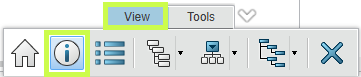
2. Select the top-level assembly node (it will highlight in blue).

User exporting derived output files from the 3DEXPERIENCE Platform interface.

3. Click the Information (i) icon in the lower toolbar.

Derived outputs including PDF, DXF, and STEP files displayed within the 3DEXPERIENCE Platform.

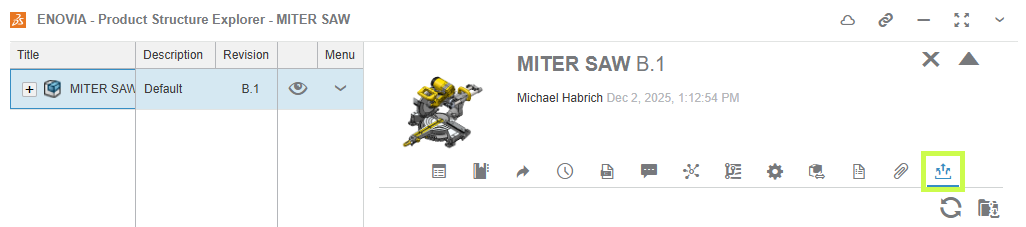
This opens the information side panel.

4. Navigate to Derived Formats.

Engineer preparing CAD-derived files for external sharing using the 3DEXPERIENCE Platform.

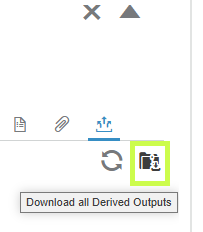
5. Click Download All Derived Outputs.

Export settings window for derived outputs on the 3DEXPERIENCE Platform.

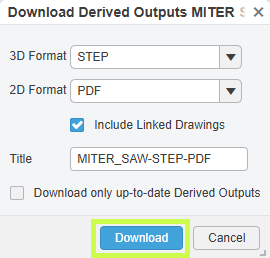
6. Choose which 2D and 3D formats you want to include.

7. Name the ZIP file and click Download.

Downloading multiple derived outputs from the 3DEXPERIENCE Platform in a packaged folder.

If you’ve added multiple assemblies to Product Explorer, you’ll need to repeat this process for each one.

Trade-off:

  • ✔ Clean output (Derived Outputs only)

  • ✖ One assembly at a time

Method 2: Export Multiple Assemblies at Once

If you need to collect outputs from several assemblies or even unrelated parts, this method is much faster.

1. Add assemblies or parts to Product Explorer.

2. Select multiple items using checkboxes or Shift + Select.

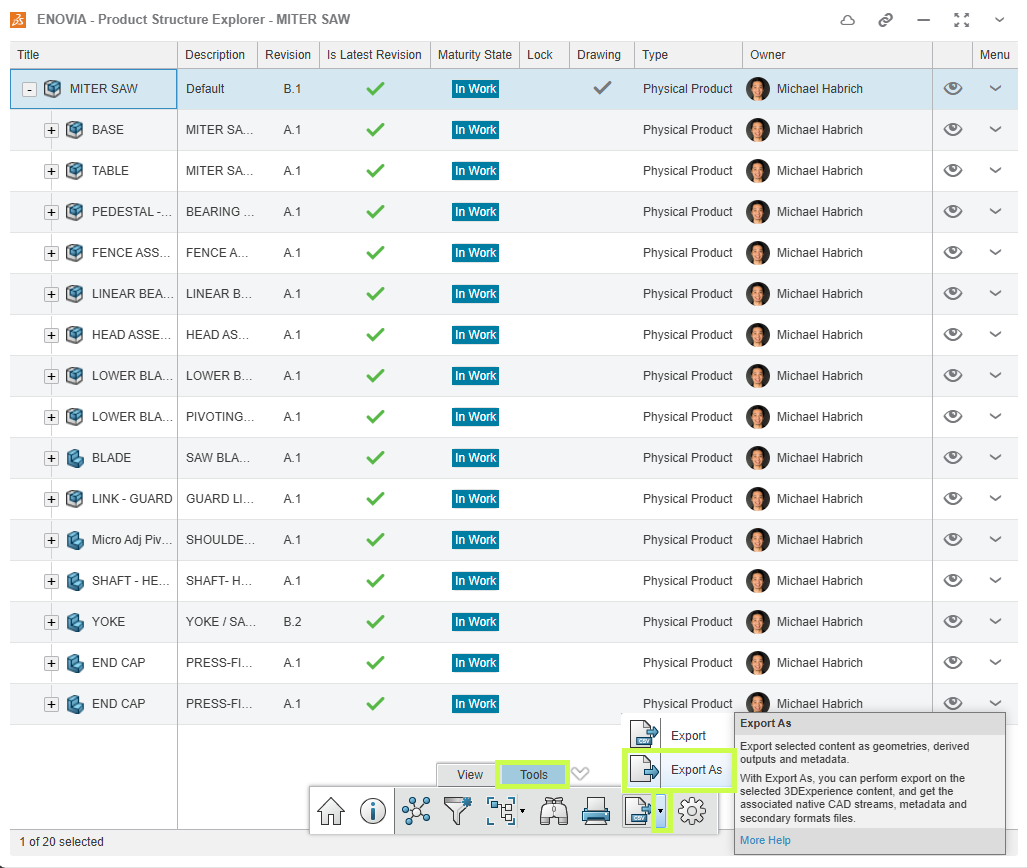
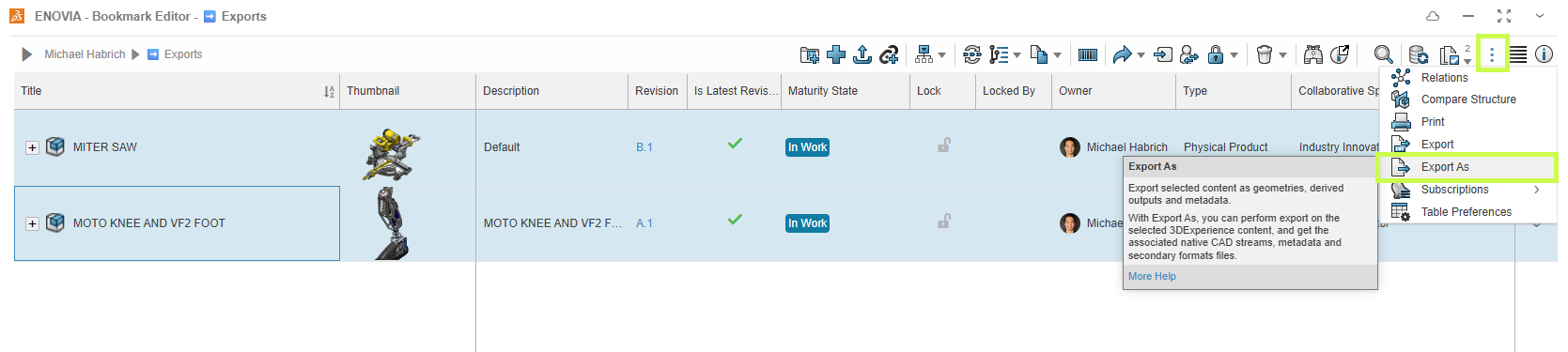
3. Click Export As from the bottom toolbar.

Example of neutral CAD file formats generated from SOLIDWORKS data in 3DEXPERIENCE

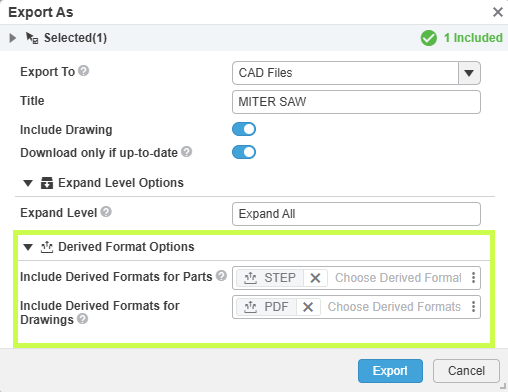
4. Name the export, enable Expand All, and set the Derived Format Options.

5. Click Export.

Collaboration workflow using exported derived outputs from the 3DEXPERIENCE Platform.

A background job will start.

Once complete:

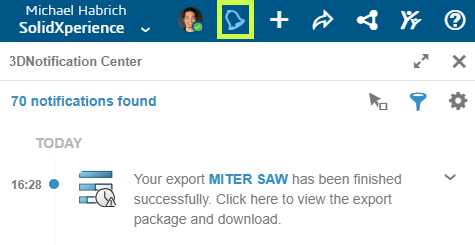
  • A notification appears in the upper-right corner.

User selecting derived output files for export from a project dashboard in 3DEXPERIENCE.
  • Click the notification to open the CAD Data Processor Monitoring app.

  • Use the Download button to retrieve the ZIP file.

Exported PDF and STEP files ready for downstream manufacturing and review.

This ZIP will include both CAD files and Derived Outputs. To keep only the outputs, simply open the ZIP in Windows Explorer, sort by file type, and remove any files you don’t need.

Trade-off:

  • ✔ Multiple assemblies or mixed files at once

  • ✖ Manual cleanup required

Using the Bookmark Editor App

Method 1: Download Outputs from a Single Assembly

1. Locate the assembly in a bookmark (or add it to one).

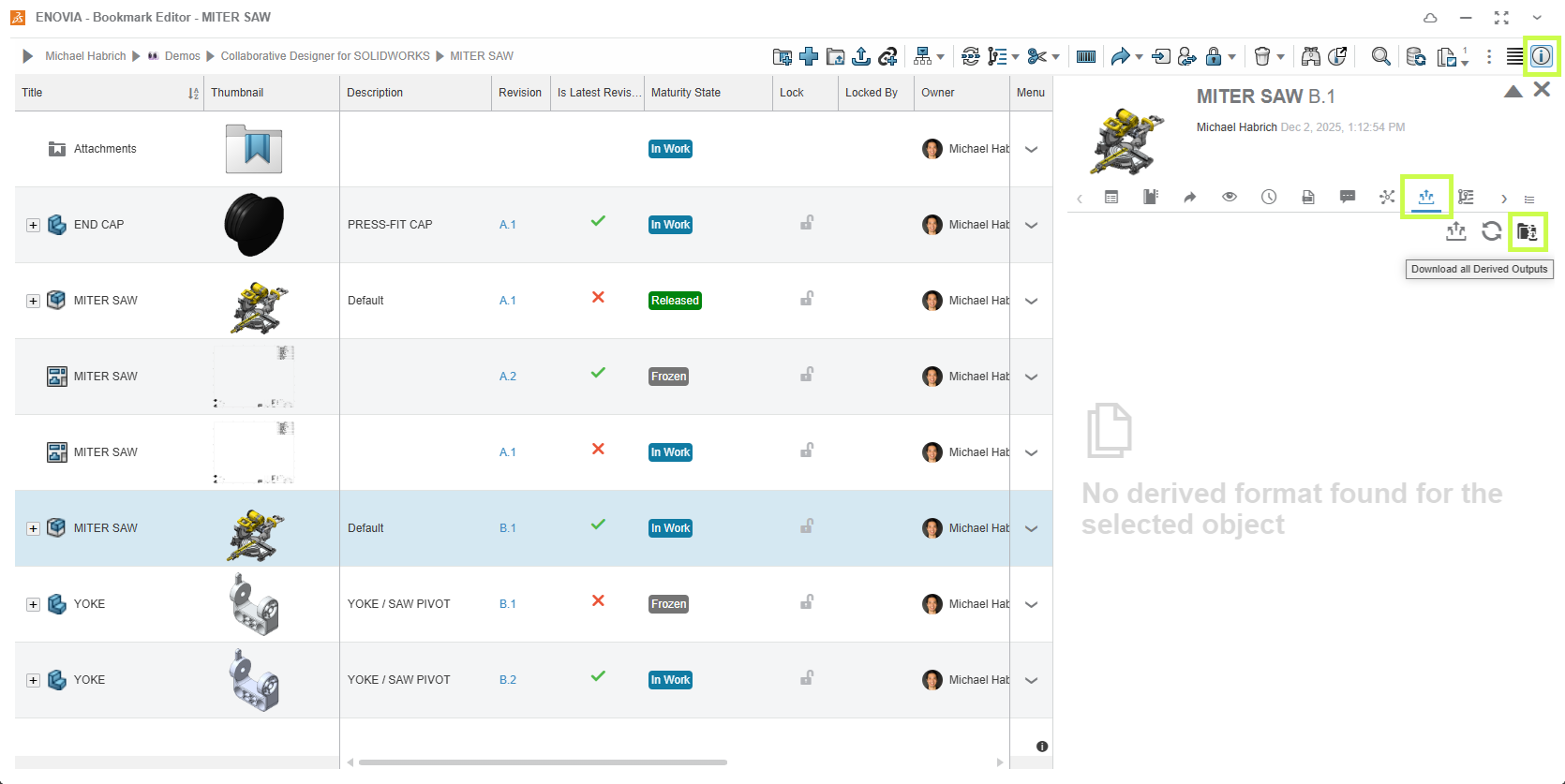
2. Right-click the assembly and choose Information, or open the side panel

3. In the window or side panel, navigate to Derived Outputs.

4. Click Download All Derived Outputs.

Packaging derived outputs into a ZIP archive from the 3DEXPERIENCE Platform.

This workflow mirrors the single-assembly method in Product Explorer.

Trade-off:

  • ✔ Simple and clean

  • ✖ One assembly at a time

Method 2: Export Multiple Items from a Bookmark

This method works the same way as the multi-selection approach in Product Explorer.

1. Add all required assemblies or parts to a bookmark.

2. Select the files you want.

3. Click Export As from the upper toolbar.

Digital workflow illustrating the transfer of derived outputs from CAD to external stakeholders.

4. Configure the Derived Format options and start the export.

As before, the resulting ZIP will include CAD data along with the Derived Outputs, so some cleanup may be required.

Trade-off:

  • ✔ Ideal for large batches or mixed content

  • ✖ Requires removing CAD files afterward

Final Thoughts

Whether you’re sending a single PDF or packaging dozens of STEP and DXF files, the 3DEXPERIENCE platform gives you flexible ways to get the right data out securely and efficiently.

The key is choosing the method that best fits your situation:

  • Single assembly, clean output → Download All Derived Outputs

  • Multiple files, faster packaging → Export As

Looking to go further?

  • Check out more tips and tutorials on our YouTube channel.

  • Explore best practices with our experts.

  • Or reach out to your Solidxperts team we’re here to help you get the most out of your platform.


Michael Habrich

3DEXPERIENCE Specialist

X_green_halo

Any questions? Need help? Ask one of our experts.

Whether you’re ready to get started or just have a few more questions, you can contact us toll-free:

    3DDrive vs. 3DSpace: What’s the Difference?

    BLOG

    3DDrive vs. 3DSpace: What’s the Difference?

    [techtips_featured_image_shortcode]

    The 3DEXPERIENCE platform includes a powerful set of tools designed to support collaborative product development. Two of the most commonly used apps for storing and managing files are 3DDrive and 3DSpace.

    At first glance, they can look similar, but they’re built for very different purposes. Understanding how each one is meant to be used will help your team work more efficiently and avoid confusion down the road.

    What Is 3DDrive?

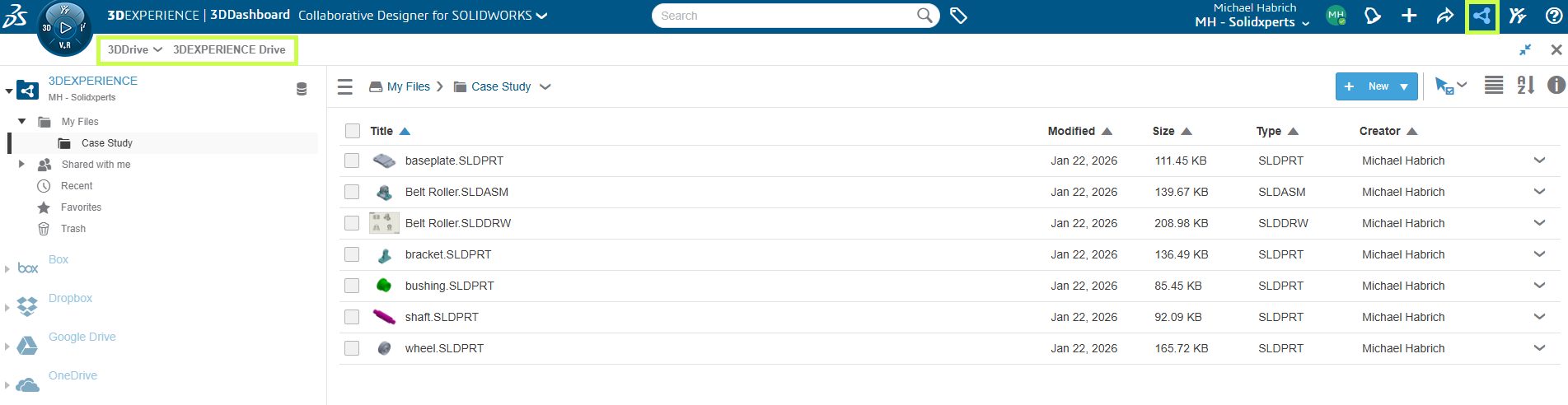
    Think of 3DDrive as the 3DEXPERIENCE equivalent of tools like Dropbox or OneDrive.

    3DDrive allows you to:

    • Store and access files from anywhere

    • Edit and collaborate on documents in real time

    • Share files easily, including with external users

    • Integrate with other cloud storage services

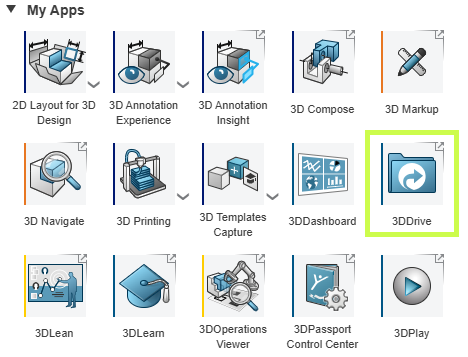
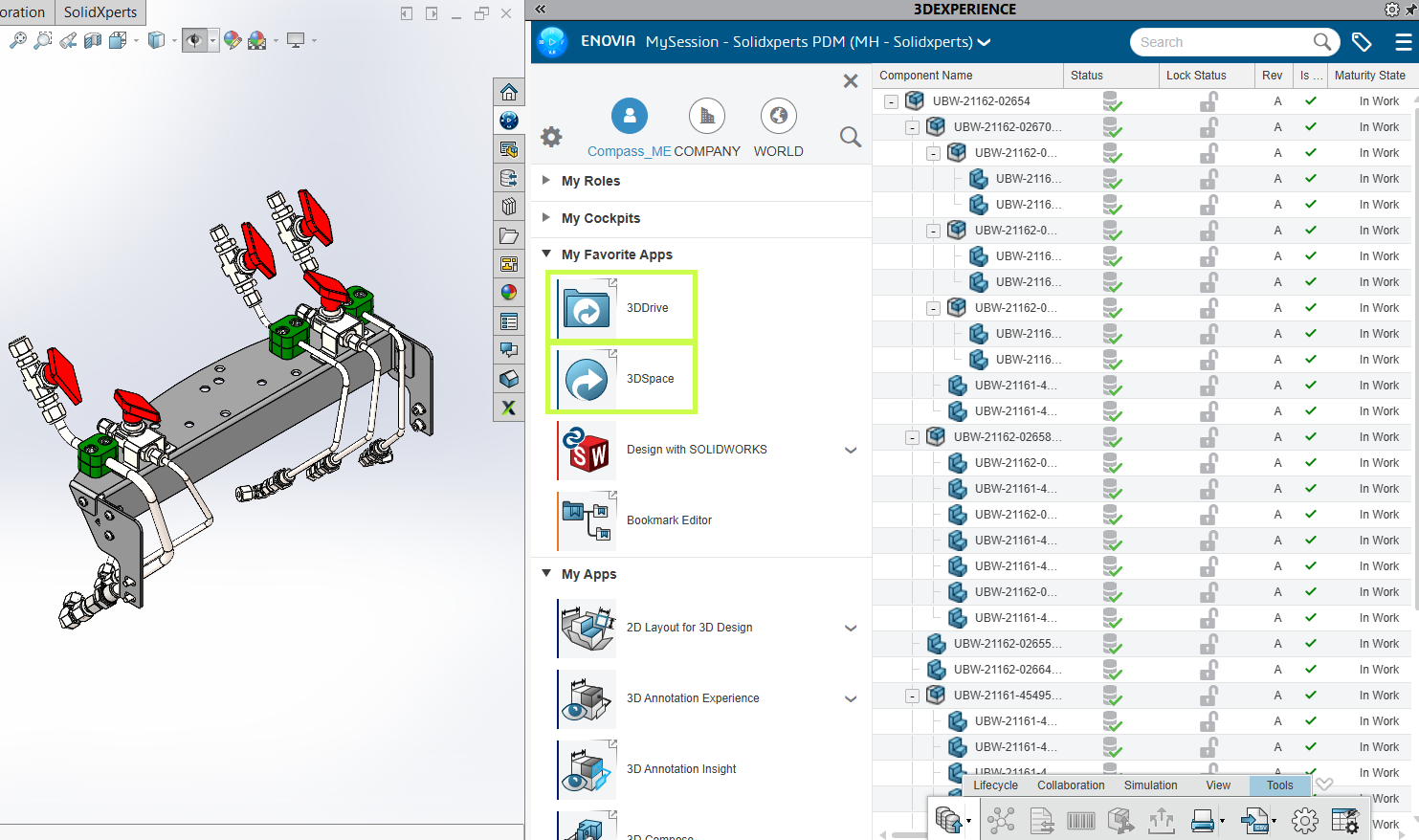
    You’ll find 3DDrive under My Apps in the 3DEXPERIENCE platform, and it’s also accessible directly inside SOLIDWORKS.

    3DDrive interface in the 3DEXPERIENCE platform for cloud file sharing and management

    3DDrive uses a familiar folder based structure and focuses on flexibility and convenience. It’s a great choice for:

    • General file sharing

    • Early-stage collaboration

    • Working with customers, suppliers, or partners outside your organization

    What it doesn’t include is built-in product data management there’s no revision control, lifecycle states, or formal approval process.

    3DDrive interface in the 3DEXPERIENCE platform for cloud file sharing and management

    What Is 3DSpace?

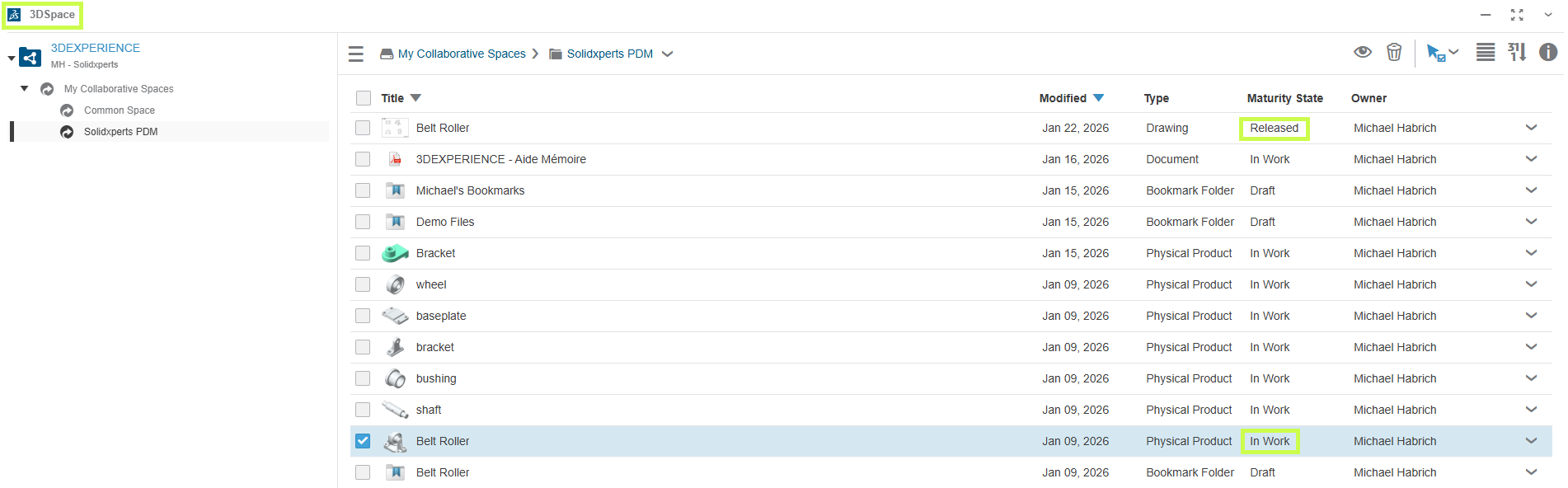
    3DSpace is built for teams that need structure, control, and traceability.

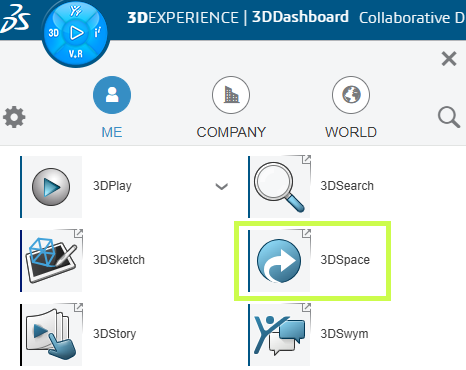
    3DSpace interface in the 3DEXPERIENCE platform for product data management and revision control

    Instead of simple folders, 3DSpace is organized around Collaborative Spaces, where teams work together on shared project data. Within 3DSpace, you can:

    • Control access and permissions

    • Track revisions and history

    • Assign maturity states like In Work and Released

    • Lock files to prevent conflicting edits

    These capabilities make 3DSpace a strong foundation for PLM-driven workflows, including:

    • Engineering change processes

    • Approval workflows

    • Long-term product data management

    3DSpace is ideal for engineering teams that need confidence in version control and data integrity.

    3DSpace interface in the 3DEXPERIENCE platform for product data management and revision control

    3DDrive vs. 3DSpace: Which Should You Use?

    The short answer: it depends on how you work.

    • 3DDrive is best when:

      • You need fast, flexible file sharing

      • You collaborate frequently with external users

      • You want a familiar, lightweight cloud storage experience

    • 3DSpace is best when:

      • You need controlled access and revision tracking

      • Your team is ready for PLM-style workflows

      • Data accuracy, traceability, and approvals matter

    The good news is that both apps integrate directly with SOLIDWORKS, so you can access the right tool without leaving your design environment.

    Comparison between 3DDrive and 3DSpace in 3DEXPERIENCE showing file sharing and product data management

    Final Thoughts

    3DDrive and 3DSpace aren’t competing tools. They’re complementary. Many teams start with 3DDrive for simple collaboration and gradually introduce 3DSpace as their data management needs grow.

    Not sure which approach makes the most sense for your team? That’s where we come in.


    Michael Habrich

    3DEXPERIENCE Specialist

    X_green_halo

    Any questions? Need help? Ask one of our experts.

    Whether you’re ready to get started or just have a few more questions, you can contact us toll-free:

      AI in SOLIDWORKS: What’s New in FD02

      BLOG

      AI in SOLIDWORKS: What’s New in FD02

      [techtips_featured_image_shortcode]

      From Features to Assistants: A Shift in How You Work

      With the SOLIDWORKS 2026 FD02 update, AI is starting to feel less like a set of isolated tools, and more like an integrated part of your workflow.

      This release introduces two major concepts:

      • AI Virtual Companions (prompt-driven interaction)

      • Contextual Performance Assistants (proactive recommendations)

      Together, they represent a shift toward software that doesn’t just respond, but actively supports your decisions in real time.

      Let’s break down what’s new and what it actually means for your day-to-day work.

      A New Direction: AI That “Thinks Alongside You”

      Up until now, most AI features in CAD have been reactive:

      • You click a command

      • The software executes

      FD02 starts moving beyond that.

      Instead, SOLIDWORKS is introducing AI that:

      • Understands context

      • Responds to natural language

      • Flags issues before they become problems

      👉 The goal isn’t automation for its own sake
      👉 It’s reducing friction in engineering workflows

      AI Virtual Companion: Working with Prompts

      One of the biggest changes in FD02 is the expansion of the AI Virtual Companion.

      This is a text-based interface inside SOLIDWORKS where you can:

      • Ask questions

      • Request actions

      • Get insights about your model

      What’s New in FD02:

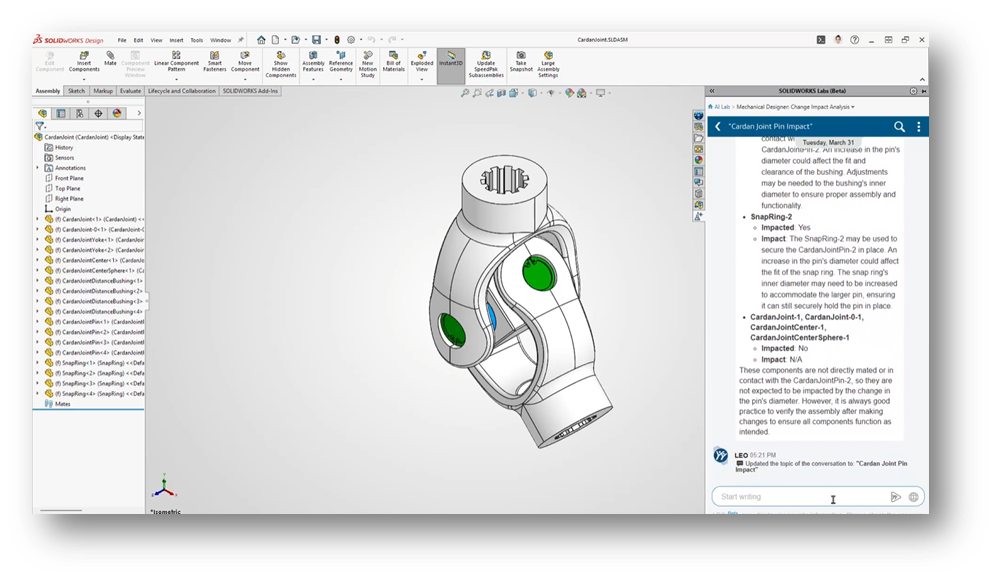
      Design Change Impact

      You can now ask:

      “What happens if I change this feature?”

      The AI will:

      • Scan the model

      • Identify affected parts and assemblies

      • Highlight downstream dependencies

      • Indicate who or what may be impacted

      Why It Matters:

      This allows you to evaluate risk before making changes, instead of reacting after something breaks.

      SOLIDWORKS 2026 FD02 interface showing AI-powered change impact analysis on a mechanical assembly model.

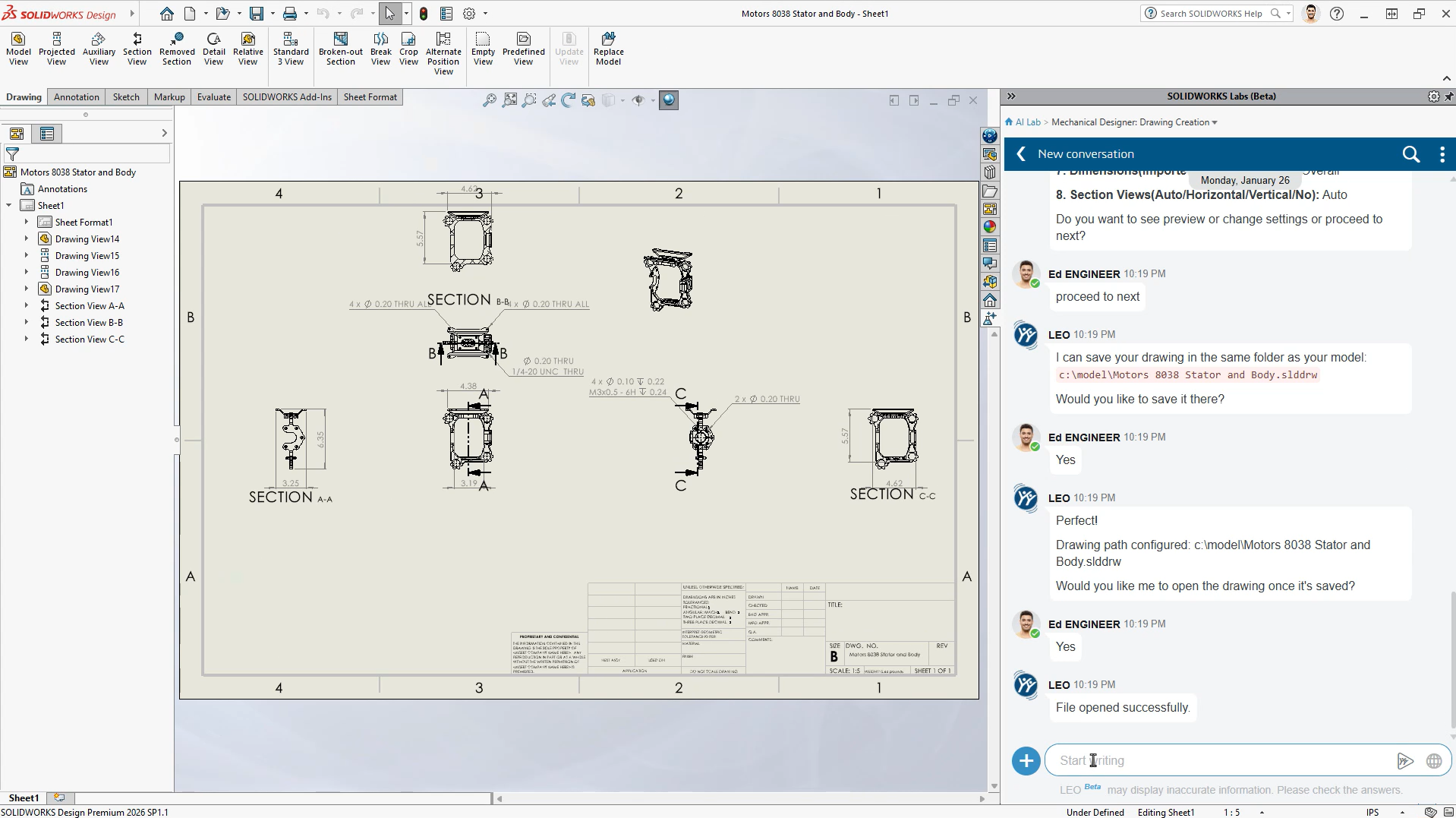
      Auto-Generate Drawings (Beta) – Now Prompt-Driven

      Auto-Generate Drawings gets a major upgrade.

      What’s New:

      • Direct access to the Drawing Creation AI skill

      • Ability to customize outputs using natural language prompts

      You can now:

      • Adjust drawing tables

      • Refine views

      • Modify layout behavior

      Why It Matters:

      You move from:

      “Generate → manually fix everything”

      to:

      “Generate → guide the result intelligently”

      SOLIDWORKS 2026 FD02 showing AI-assisted drawing creation with a conversational interface generating and saving technical drawings automatically.

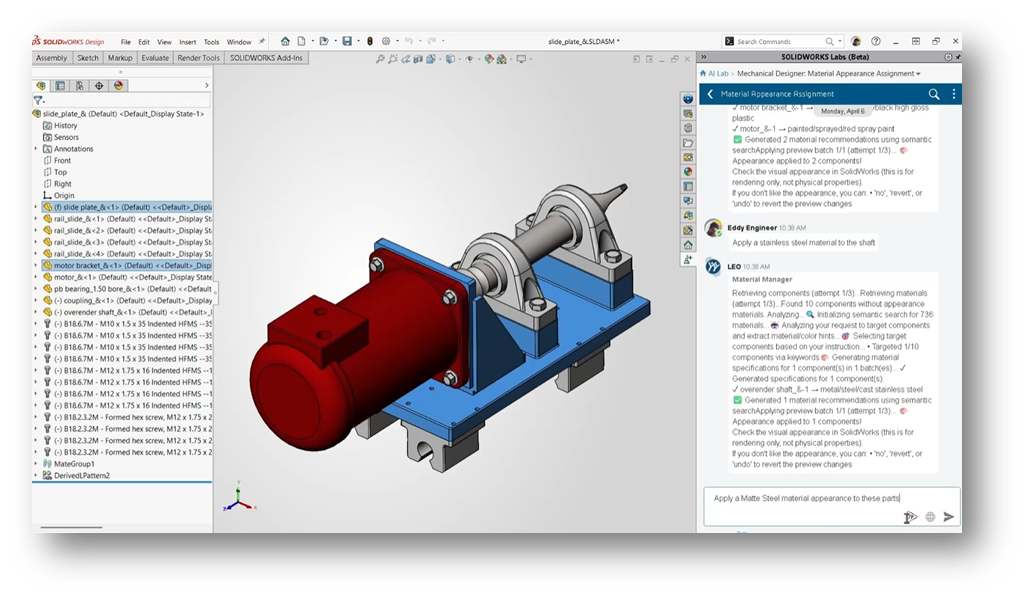
      Material Appearance Manager (Beta)

      What’s New:

      Using simple prompts, you can:

      • Apply material appearances

      • Update visuals across assemblies

      • Maintain consistency automatically

      Why It Matters:

      It removes repetitive cleanup work and improves visual standardization, especially in larger assemblies.

      SOLIDWORKS 2026 FD02 interface showing AI-assisted material appearance assignment on a mechanical assembly using natural language prompts.

      Contextual Performance Assistants: Proactive Help

      The second major innovation in FD02 is the introduction of always-on performance assistants.

      Instead of waiting for you to troubleshoot, these tools:
      👉 Monitor your work in real time
      👉 Flag issues as they appear
      👉 Recommend fixes immediately

      You’ll typically see these as contextual prompts or purple notifications in the interface.

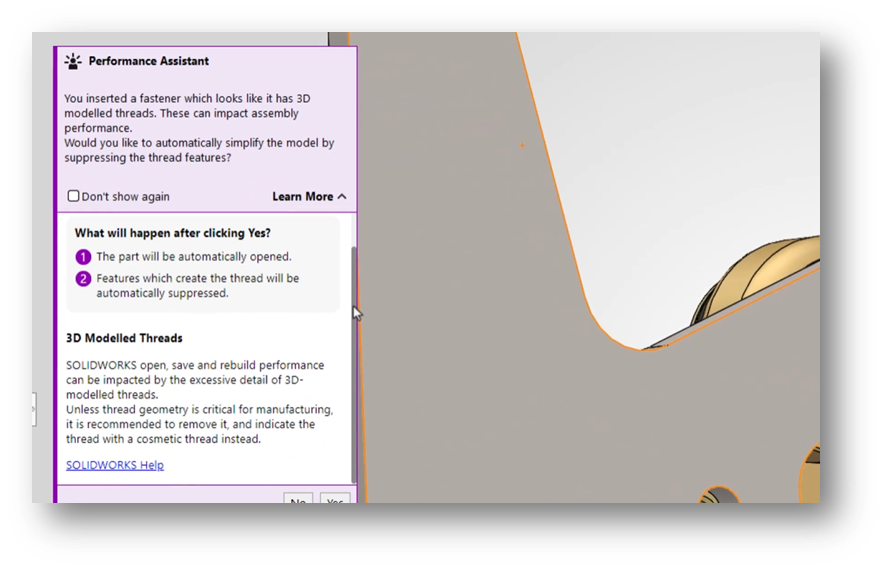
      Fastener Simplification

      When inserting detailed fasteners (like threaded hardware):

      The assistant will:

      • Detect performance-heavy geometry

      • Explain the impact

      • Offer to suppress threads automatically

      Why It Matters:

      This is a perfect example of AI preventing problems before they slow you down.

      SOLIDWORKS 2026 FD02 Performance Assistant warning users about detailed threaded fasteners and recommending automatic geometry simplification to improve assembly performance.

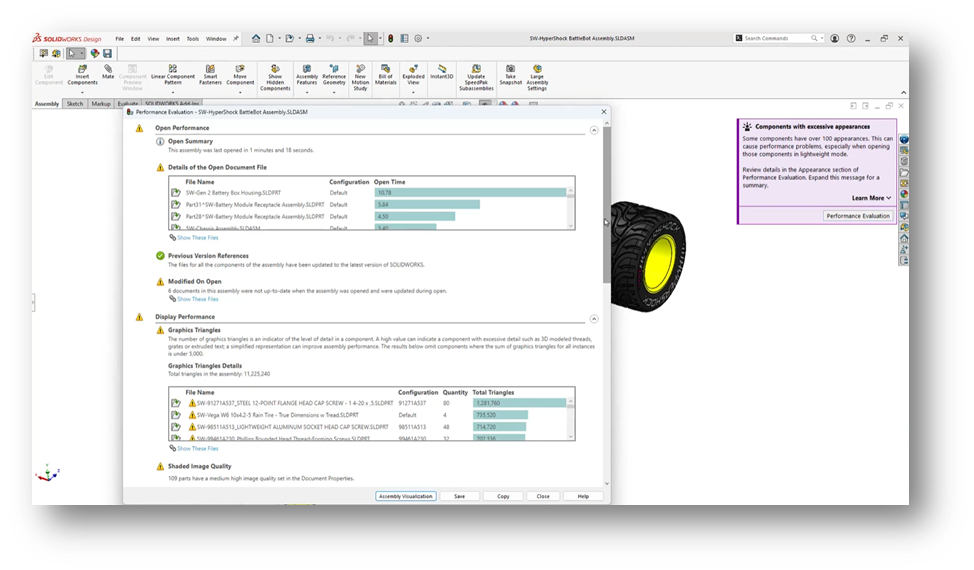
      Assembly Performance Evaluator (Beta)

      What’s New:

      You can now:

      • Ask questions about assembly performance

      • Receive AI-generated diagnostics

      • Get targeted recommendations

      Why It Matters:

      Large assemblies are complex to troubleshoot manually.

      This tool turns:

      Trial-and-error debugging

      into:

      Guided, data-driven optimization

      SOLIDWORKS 2026 FD02 showing AI-driven assembly performance evaluation with diagnostics and recommendations for optimizing large assemblies.

      AI-Driven Modeling: Fixing a Longstanding Problem

      BREP to Parametric CAD (Beta)

      This is one of the most impactful additions in FD02.

      What’s New:

      AI converts:

      • STEP

      • IGES

      into:

      • Fully editable, feature-based SOLIDWORKS models

      Why It Matters:

      You can:

      • Modify imported geometry

      • Avoid rebuilding parts from scratch

      • Work faster with supplier or legacy data

      This directly addresses one of the biggest inefficiencies in CAD workflows.

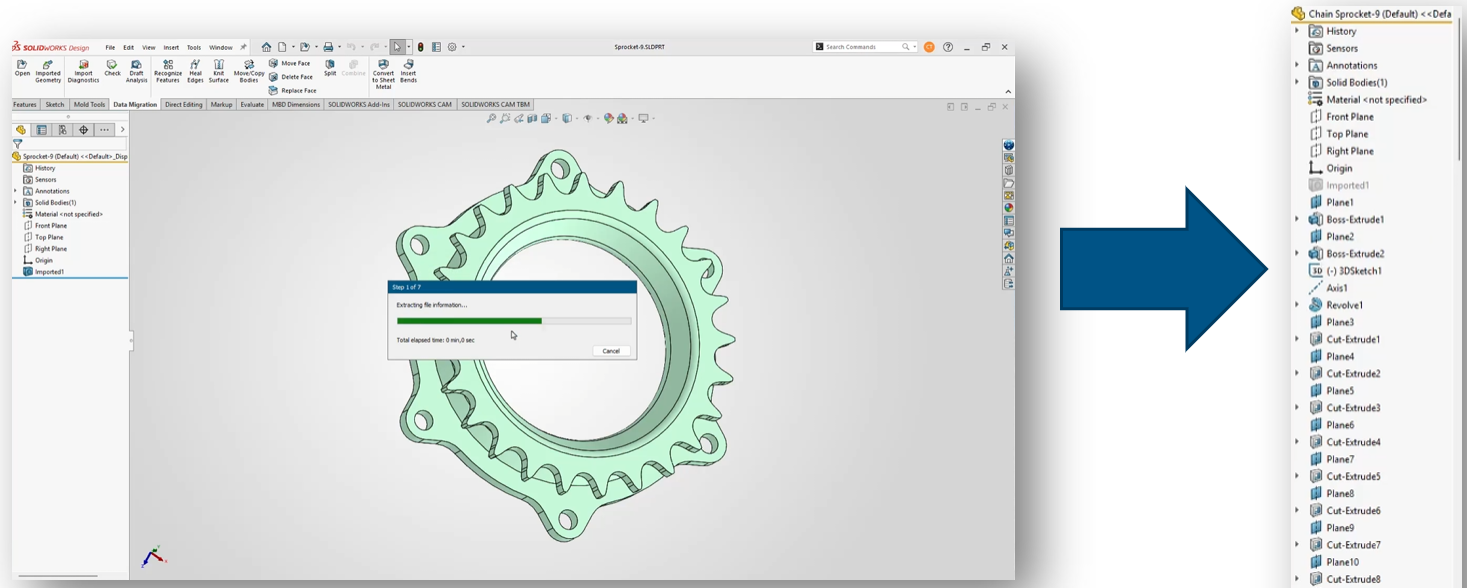
      SOLIDWORKS 2026 FD02 converting imported geometry into a fully editable parametric CAD model using AI-driven feature recognition.

      AI Beyond CAD: Data and Governance:

      FD02 also expands AI into data management and PLM workflows.

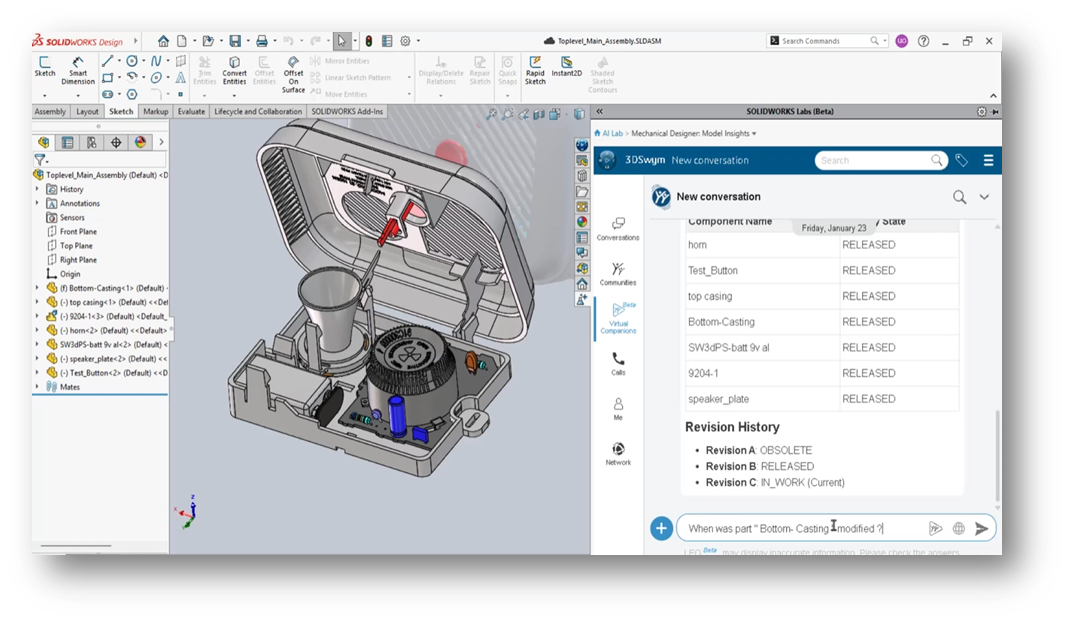
      PLM Model Insights

      You can query:

      • Revision history

      • Ownership

      • Maturity state

      • Related files

      Using natural language.

      SOLIDWORKS 2026 FD02 showing AI-powered PLM model insights with revision history and lifecycle data accessed through natural language queries.

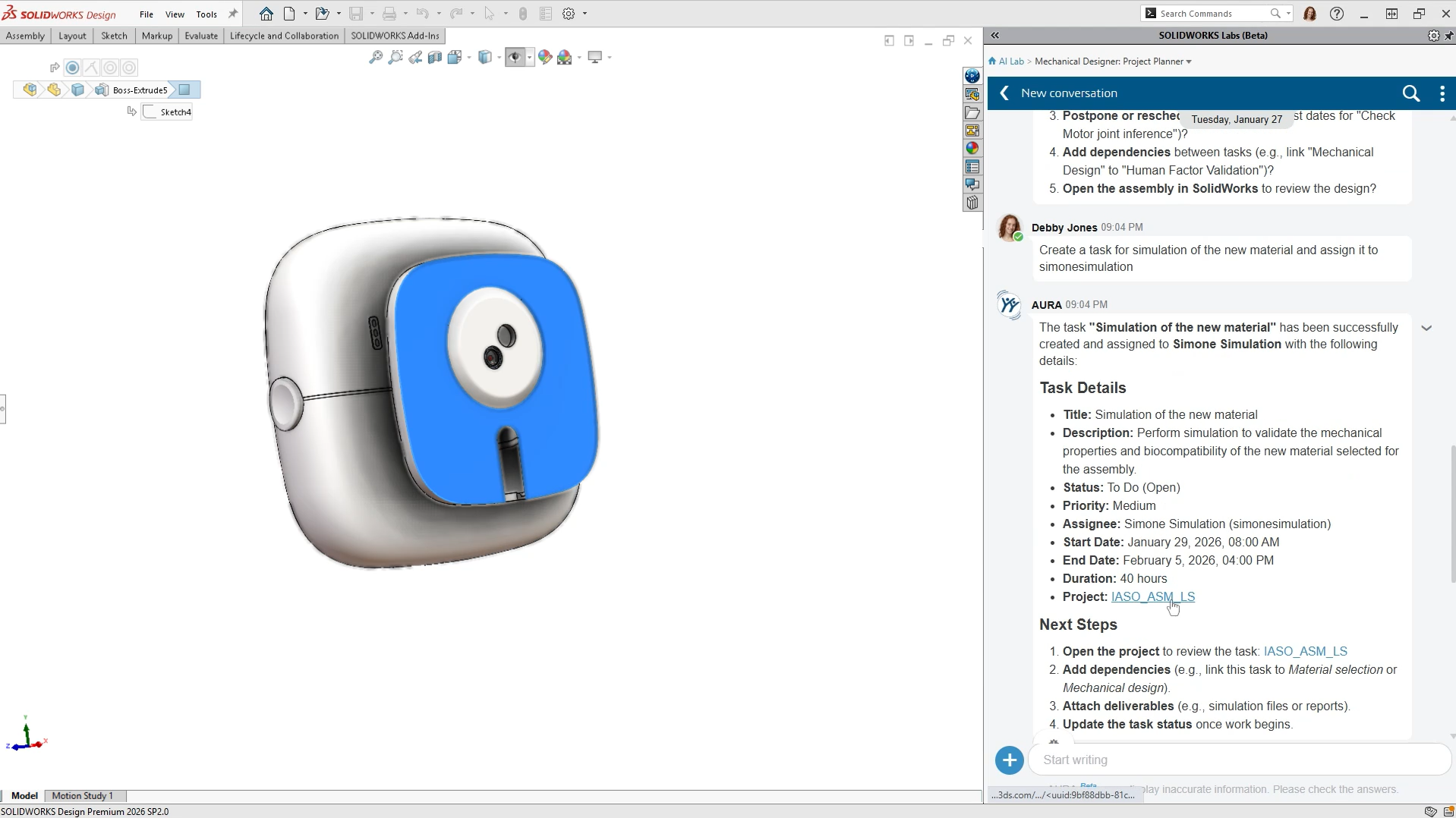
      Governance Automation (Beta):

      Includes:

      • Auto Task Creation

      • Create PLM Change Action

      Why It Matters:

      AI is now helping manage:

      • Workflows

      • Approvals

      • Change processes

      Not just geometry.

      SOLIDWORKS 2026 FD02 showing AI-assisted project planning and automatic task creation within a PLM workflow interface.

      A Clear Trend: From Tools to Teammates:

      Looking at FD02 as a whole, the direction is clear.

      AI in SOLIDWORKS is evolving toward:

      • Conversational interaction (ask instead of search)

      • Proactive assistance (alerts instead of errors)

      • Automation of repetitive tasks

      • Better visibility into design and data

      This isn’t about replacing engineers.

      It’s about:
      👉 Reducing manual overhead
      👉 Improving decision-making
      👉 Keeping workflows moving

      What You Need to Access These Features:

      To use most AI functionality in FD02, you’ll need:

      • SOLIDWORKS 2026 (FD02 or newer)

      • Access to the 3DEXPERIENCE platform

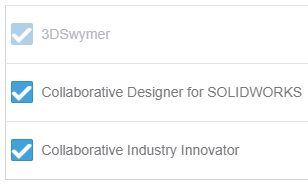
      • Proper roles (e.g., Collaborative Designer for SOLIDWORKS)

      • Active cloud connectivity

      Need help? Follow our guide on how to get started with AI in SOLIDWORKS:
      Guide: Getting Started with AI in SOLIDWORKS

      Should You Start Using AI in FD02?

      Yes, but with a clear strategy.

      Start with:

      • Assembly Performance Evaluator

      • Auto-Generate Drawings

      Then explore:

      • BREP to Parametric CAD

      • Design Change Impact

      Keep in mind:

      • Many features are Beta

      • Outputs should always be validated

      • AI is an assistant, not a decision-maker

      AI Is Becoming Embedded

      FD02 marks an important shift as we move from standalone AI features to integrated, workflow-aware intelligence. But the biggest change is not necessarily what AI can do. It’s how naturally it fits into the way engineers already work every day.


      Michael Habrich

      3DEXPERIENCE Specialist

      X_green_halo

      Any questions? Need help? Ask one of our experts.

      Whether you’re ready to get started or just have a few more questions, you can contact us toll-free:

        How SOLIDWORKS AI Is Being Positioned by Manish Kumar

        BLOG

        How SOLIDWORKS AI Is Being Positioned by Manish Kumar

        [techtips_featured_image_shortcode]

        The Future of Work: Shifting from Automation to Value Creation

        In the age of AI, I am often asked: What is the true nature of “value”? For engineers, the pressure to reduce costs and optimize workflows is constant. Historically, we turned to simple task automation. Today, AI is shifting the focus from merely speeding up repetitive tasks to amplifying human ingenuity.

        Redefining Value in Engineering

        What is the real value of an engineer? It isn’t clicking a mouse to create a sketch; it is problem-solving and innovation.

        Consider a visit to the doctor. Is a doctor’s value found in typing notes into a chart, or in the focused diagnosis and long-term health planning they provide? Today, many doctors use specialized AI companions to handle transcription, allowing them to give patients their undivided attention.

        Similarly, an engineer’s value lies in ideation and rapidly converting concepts into virtual twins for experimentation. The manual steps—the clicks to create geometry—are a means to an end. While some fear AI will take away the “enjoyable” parts of CAD, we must ask: do you enjoy the manual execution, or the creative breakthrough? Automating the “busy work” of drawing creation lets us return to the reason we became engineers in the first place: creative problem-solving.

        The Human Role in an AI-Driven Future

        A common concern is that AI will replace human oversight. I strongly disagree. When designing a turbine blade or an aircraft engine, human validation is critical—lives depend on it.

        AI acts as a multiplier, not a replacement. If an engineer produces one design today, AI might help them produce ten tomorrow. This actually increases human responsibility. Engineers must review more outputs, ensure regulatory compliance, and make higher-level decisions. AI expands our capabilities, but it does not originate ideas. Just as AI image generators require a human prompt and refined intent, 3D CAD will always require human direction.

        This is the democratization of design. Thirty years ago, SOLIDWORKS brought CAD to every desktop, democratizing 3D CAD. Today, AI is the next wave of that movement, making 3D modeling accessible so more people can solve massive, complex problems.

        Embracing the Multiplier

        As I said at 3DEXPERIENCE World in February: AI is the engine; you are the driver.

        Professionals should never underestimate their worth. AI is a tool to unlock your potential, and the gap between early adopters and those who resist will only continue to grow. Learning to make AI work for you is the key to staying at the forefront of the innovation revolution.

        So, I ask you: which of your tasks could be delegated to agentic AI, or virtual companions, to help you better showcase your true value? I look forward to hearing from you and seeing what our future holds.

        X_green_halo

        Any questions? Need help? Ask one of our experts.

        Whether you’re ready to get started or just have a few more questions, you can contact us toll-free:

          Guide: Getting Started with AI in SOLIDWORKS

          BLOG

          Guide: Getting Started with AI in SOLIDWORKS

          [techtips_featured_image_shortcode]

          Artificial Intelligence is quickly becoming part of everyday engineering workflows, but if you’re a SOLIDWORKS user, the big question is usually:

          “Where do I even start?”

          The good news is that AI in SOLIDWORKS isn’t something separate you need to learn from scratch. It’s already being integrated into the tools you use every day through the 3DEXPERIENCE platform.

          In this guide, we’ll walk through everything you need to get started, step by step:

          • Required software and prerequisites

          • Activating the 3DEXPERIENCE platform

          • Installing the Design with SOLIDWORKS connector

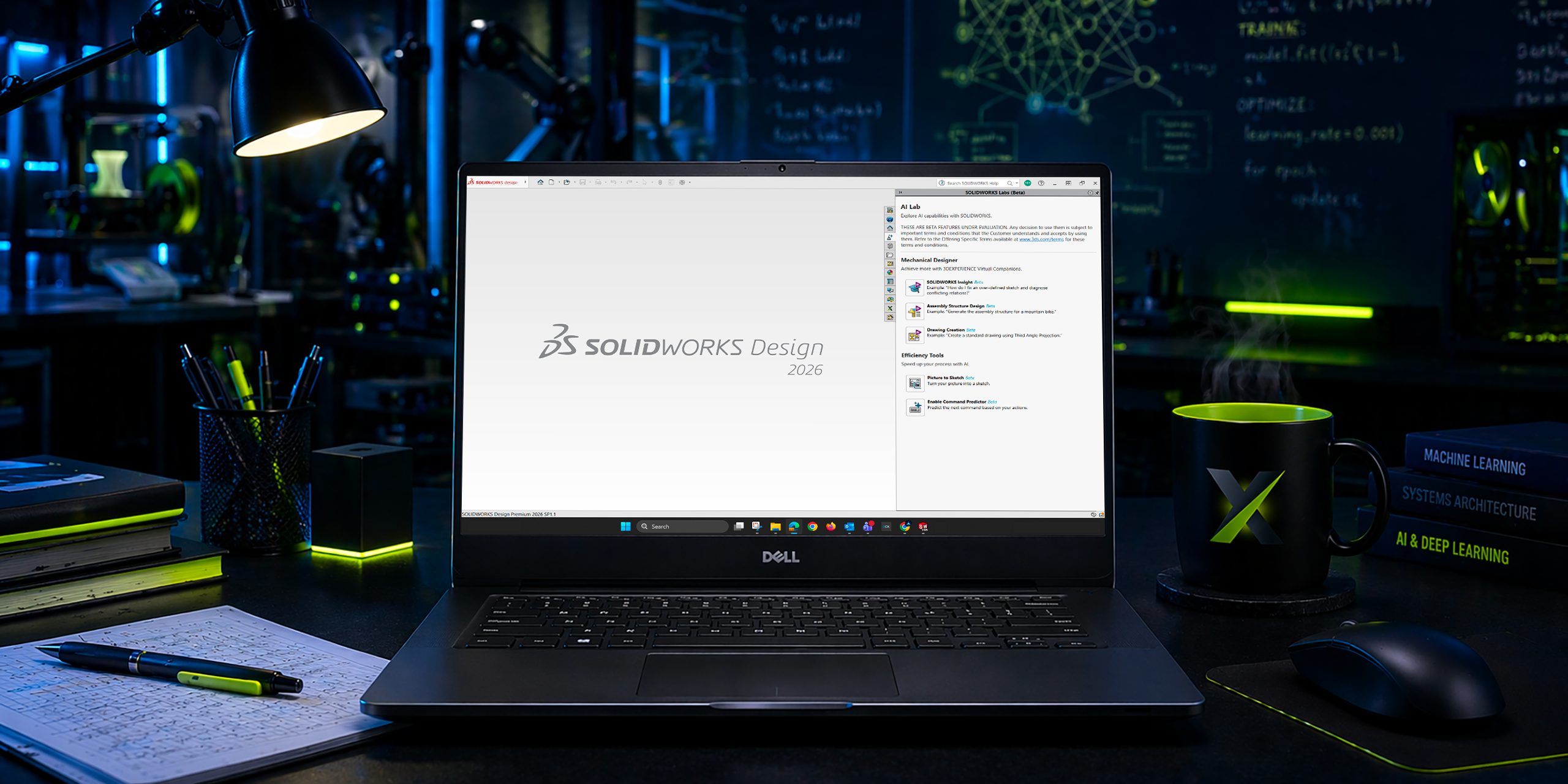
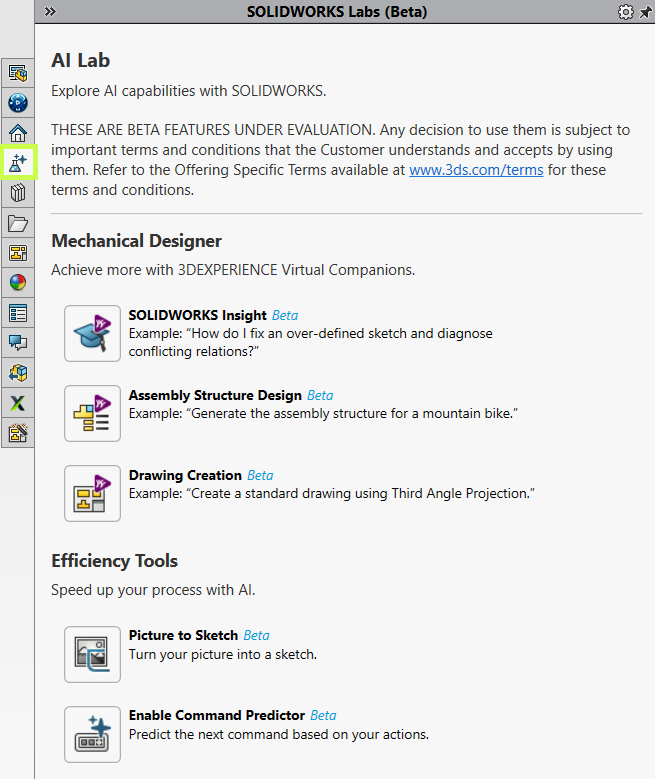
          • Accessing AI tools like the new AI Labs tab

          No fluff, just what you need to get up and running.

          Step 1: Understand What “AI in SOLIDWORKS” Actually Means

          Before jumping into setup, it’s important to clarify something:

          AI in SOLIDWORKS isn’t a single feature. It’s a set of capabilities delivered through the 3DEXPERIENCE platform.

          Today, that includes things like:

          • Design assistance and recommendations

          • Automation of repetitive tasks

          • Data-driven insights

          • Early access tools in AI Labs

          In other words, AI is layered into your workflow, not replacing it.

          Step 2: Confirm Your Prerequisites

          Before you can access any AI-driven tools, you’ll need a few key components in place.

          Required Software

          • SOLIDWORKS 2026 (or newer)

          • Active subscription (required for cloud services integration)

          Platform Access

          • A 3DEXPERIENCE platform account

          • Assigned roles (including Collaborative Designer for SOLIDWORKS)

          System Requirements

          • Stable internet connection

          • Admin rights for installation

          • Browser access to the platform

          If you’re missing any of these, that’s your starting point.

          Step 3: Activate the 3DEXPERIENCE Platform

          AI functionality depends on your connection to the 3DEXPERIENCE platform.

          How to Activate:

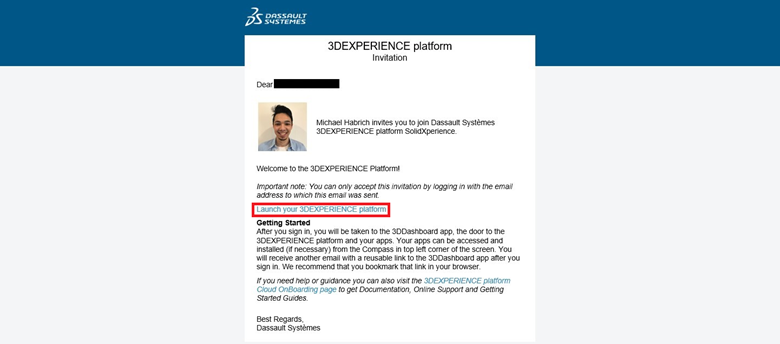
          • Check your welcome email from Dassault Systèmes
          • Click the activation link
          • Set your password and log in
          • Access your platform dashboard

          Once inside, you should see your roles and available apps.

          Still confused? Follow our Getting Started guide:
          Getting Started with the 3DEXPERIENCE Platform

          Step 4: Install the 3DEXPERIENCE Launcher

          Before installing any apps, you’ll need the 3DEXPERIENCE Launcher.

          Steps:

          • Log into your 3DEXPERIENCE platform
          • Navigate to the Compass (top-left menu)
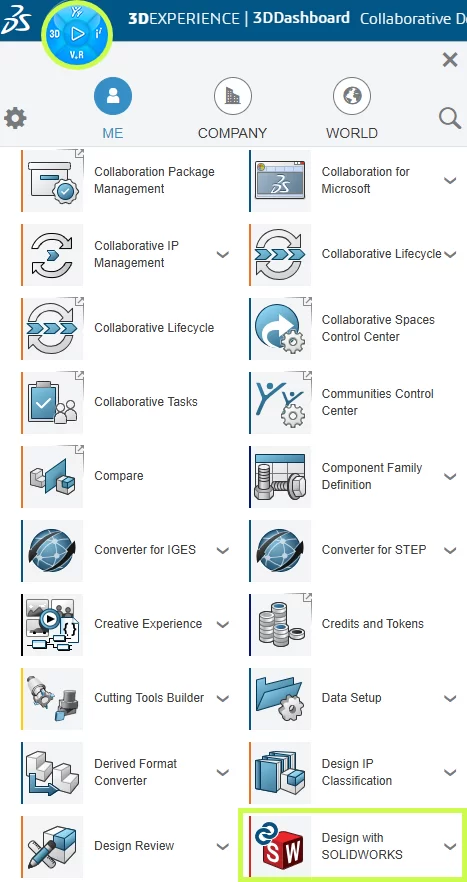
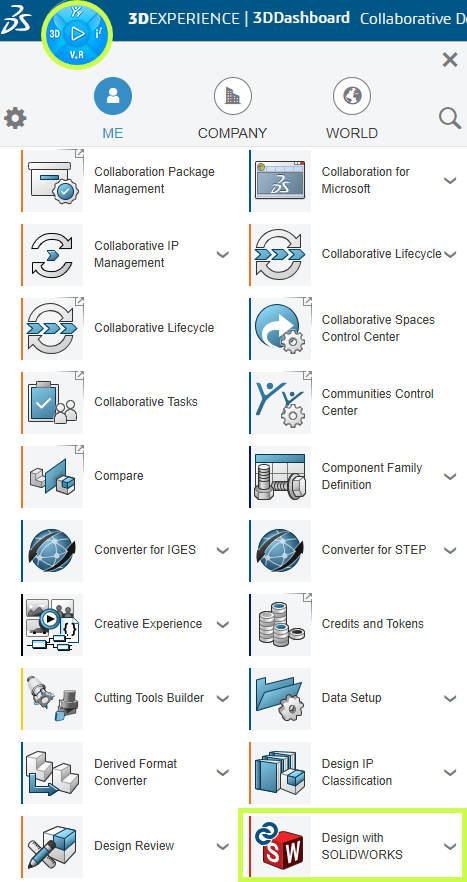
          • Scroll down to My Apps and locate Design with SOLIDWORKS.
          • Select the app to begin the installation.
          • Click Install Launcher when prompted
          • Run the installer

          This tool acts as the bridge between your browser and desktop applications.

          Step 5: Install “Design with SOLIDWORKS”

          This is the most important step.

          The Design with SOLIDWORKS connector is what links your desktop SOLIDWORKS environment to the platform, and enables AI-driven features.

          Installation Steps:

          • In the platform, search for Design with SOLIDWORKS
          • Click Install
          • Accept default settings (recommended)
          • Complete installation
          • Restart your machine if prompted

          Once installed, your environment is officially “connected.”

          Having trouble? Check out our installation guide:
          Connect SOLIDWORKS Desktop to the 3DEXPERIENCE Platform

          Step 6: Launch SOLIDWORKS from the Platform

          This step is often missed, however, it is absolutely critical.

          First Launch:

          • Go to the platform
          • Click Open on Design with SOLIDWORKS
          • Launch SOLIDWORKS from the browser

          Why this matters:

          This ensures:

          • Your session is authenticated
          • The connector is active
          • Cloud services are initialized

          If you launch SOLIDWORKS directly from your desktop first, you may not be connected properly.

          Step 7: Verify the 3DEXPERIENCE Add-in

          Once SOLIDWORKS opens, confirm everything is working.

          Check:

          • A 3DEXPERIENCE tab appears in the task pane
          • Add-in is enabled under:
            Tools > Add-ins

          If it’s not active:

          • Enable it manually
          • Restart SOLIDWORKS if needed

          This confirms your system is fully connected.

          Step 8: Access the AI Labs Tab

          Now we get to the interesting part.

          With everything configured, you should have access to AI Labs, where new AI-driven tools are introduced.

          Where to Find It:

          • Inside SOLIDWORKS (Task Pane)
          • Look for AI Labs tab

          What You’ll Find:

          • Experimental AI features
          • Early access tools
          • Workflow enhancements powered by AI

          These features evolve quickly, so expect changes over time.

          Step 9: Start Using AI Features (Practical Examples)

          Once inside AI Labs or connected tools, start small.

          Good First Use Cases:

          • Automating repetitive design steps
          • Getting design suggestions
          • Exploring data-driven insights

          What Not to Expect:

          • Fully automated design generation
          • “One-click engineering”

          AI is there to assist, not replace your expertise.

          Step 10: Best Practices for Getting Started

          This is where most teams succeed or struggle.

          ✔ Start Small

          Don’t try to overhaul your entire workflow.

          ✔ Focus on Real Problems

          Look for:

          • Repetitive tasks
          • Bottlenecks
          • Manual processes

          ✔ Validate Everything

          AI suggestions still require engineering judgment.

          ✔ Train Your Team Gradually

          Adoption works best when it’s incremental.

          Final Thoughts: Where AI in SOLIDWORKS Is Headed

          AI in SOLIDWORKS is evolving, but the direction is clear:

          • More automation of low-value tasks
          • Better decision support
          • Deeper integration with simulation and data

          And importantly:

          SOLIDWORKS isn’t being replaced, it’s being enhanced.

          For most teams, the real opportunity isn’t jumping ahead, it’s simply getting started.

          For more information on AI in SOLIDWORKS, reach out to us through our website:
          SOLIDWORKS AI: Transform Your Design with Artificial Intelligence


          Michael Habrich

          3DEXPERIENCE Specialist

          X_green_halo

          Any questions? Need help? Ask one of our experts.

          Whether you’re ready to get started or just have a few more questions, you can contact us toll-free:

            AI won’t replace you. Someone using AI will.

            BLOG

            AI won’t replace you. Someone using AI will.

            [techtips_featured_image_shortcode]

            AI may not be perfect yet, but it’s precisely why you should start using it today.

            We’ve grown used to talking about artificial intelligence as if the story began in 2022. ChatGPT arrives, the public adopts it, and suddenly AI becomes a topic of casual conversation. But if we want to properly understand what’s happening, we must not confuse media frenzy with historical reality. OpenAI did release ChatGPT publicly (“research preview”) on November 30, 2022, and yes, it was a real social inflection point.

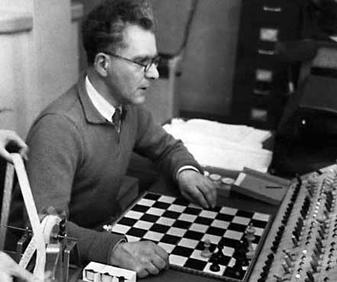
            But AI as a field is much older. Turing formalized the intellectual framework of the “imitation game” as early as 1950, and the Dartmouth Proposal (1955) explicitly announced a summer 1956 project dedicated to “artificial intelligence.” Some early demonstrations also appeared quickly: the Ferranti Mark I ran a limited chess program in 1951 (mate-in-two).

            This reminder is not meant to give you a history lesson. It serves one purpose: AI is not a feature. It is a trajectory.

            And it resembles another well-known human trajectory: that of fire.

            The Fire Analogy: Understanding a Technology We Don’t Yet Understand

            At this point, you’re probably thinking: “What is he talking about?” Stay with me.

            One day, in a cave, one of our ancestors discovered fire. At first, this discovery served very specific purposes: heating, lighting, protection. These were not “industrial innovations”; they were immediate uses. And yet, the full chain – metallurgy, machines, steel industries – that followed from this same discovery reshaped modern history. The human on day one could not imagine the human of today. Not because they were less intelligent, but because they lacked perspective.

            We are at the same stage. Except instead of holding a torch, we are writing prompts. And the typical mistake in 2026 is judging AI based on what it is today, as if it were representative of tomorrow’s trajectory.

            The Real Signal: Speed of Evolution

            What matters is not only what AI does today. What matters is how fast it improves. To make that speed tangible, a cultural artifact has emerged: the “Will Smith Eating Spaghetti test,” now documented as an informal benchmark.

            Case Study: The “Spaghetti Test”

            In its 2023 version, human motion is unstable: faces and hands deform, physics is not believable. In the 2026 version, the result becomes coherent enough that the difference is obvious: we are no longer looking at a “grotesque meme,” but at a rendering that requires a critical eye to detect AI involvement.

            What matters here is the underlying learning dynamic. The progression observed between 2023 and 2026 cannot be attributed solely to model improvements. It is also the result of user adoption.

            Early uses produced low-quality, unstable, and difficult-to-use outputs. However, these experiments helped gradually identify model limitations, refine interaction methods (prompts, iterations, post-processing), and structure more robust practices.

            In other words, the improvement in outputs in 2026 is inseparable from the learning accumulated by users over time. Current performance is not only technological; it is also cognitive and methodological.

            This is how the concept of cumulative advantage should be understood: it does not rely solely on access to technology, but on the experience gained by using it under imperfect conditions.

            From Internet Culture to the Engineering Office: Why SOLIDWORKS Is Concerned

            The transition from “spaghetti → SOLIDWORKS” is not arbitrary. It is the same mechanism applied in a different context. A general-purpose technology crosses a threshold, then infiltrates products, becomes invisible, and ultimately reshapes practices.

            We’ve already seen this in the 2010s: AI did not “look like ChatGPT,” but it was already embedded in everyday life. Google Maps, for example, deployed models (including graph neural networks) at scale for ETA (Estimate Time of Arrival) and traffic prediction. The result: you use AI without thinking about it. The advantage rarely comes from an “AI button,” but from the routines that evolve around your activity.

            SOLIDWORKS 2026: The AI Shift Is Underway

            This is exactly the same dynamic in SOLIDWORKS.

            SOLIDWORKS 2026 already integrates AI into areas where real time is lost: drawings, assemblies, and access to knowledge. Dassault Systèmes presents SOLIDWORKS 2026 as an “AI-powered” portfolio (design, collaboration, data management).

            A clear example: Auto-Generate Drawings (BETA). The “What’s New in SOLIDWORKS 2026” documentation explicitly describes automatic drawing generation, including section views and hole callouts.

            The same logic applies to assemblies: SOLIDWORKS documents AI-based fastener recognition to automatically create SmartMates, with explicitly listed limitations. This level of detail is precisely what makes the promise credible (and reminds us that this is not “magic,” but engineering with constraints).

            Rather than listing every available feature, it is more relevant to focus on the direction: Dassault introduces “Virtual Companions” (AURA, LEO, MARIE), with AURA and LEO already available and MARIE announced soon. SOLIDWORKS also highlights “AI-guided” features in FD01 (guided analysis, guided creation).

            What matters here is not proving that everything is ready. It is recognizing that AI has entered the tool, meaning the learning process has begun, whether you like it or not. And it is moving fast.

            Waiting for Maturity: A Strategic Mistake

            Let’s be clear: in 2026, all of this is still imperfect. And that is normal. We are at the “spaghetti 2023” stage of AI-assisted CAD: promising, functional in certain areas, but not yet obvious everywhere.

            The instinctive reaction for many teams is: “we’ll wait until it’s mature.”

            This reaction is human. But strategically, it is a serious mistake.

            In 2025, we clearly entered a phase of mass adoption. Nearly 88% of organizations report using AI in at least one function, compared to 78% the previous year. This adoption is accelerating and follows an exponential curve.

            From an economic perspective, the signals are just as clear. The generative AI market reached nearly $60 billion in 2025 and could exceed $400 billion by 2031.

            In industry, the shift is already visible: nearly 76% of manufacturing companies are using AI in 2026.

            But the most interesting point is not adoption. It is the gap between adoption and impact. Despite massive investments, only about 5% of companies currently manage to generate significant value from AI. In most cases, projects remain stuck at the experimental stage, and the majority of initiatives never reach production.

            In other words: everyone has access to AI, but very few truly know how to use it. So “waiting” does not mean being cautious. It means allowing a capability gap to form. Because knowing how to use AI is a skill. And it must be learned.

            What Research Says About Gains (and Their Limits)

            To address the assumption “we’ll wait until AI is ready,” it is important to understand a key nuance: AI does not deliver uniform gains, and that is precisely why early learning matters.

            The operational conclusion is simple: early adoption is not a blind bet; it is a mapping phase. It helps you understand when AI works, when it fails, and most importantly how to control it.

            What It Really Changes: Redefining Engineering Performance

            This is where the thesis becomes concrete: AI will not replace you. A competitor who masters it will.

            And I mean mastery in the strict sense. Asking ChatGPT for a carbonara recipe does not count. We are talking about work practices, standards, quality control, understanding when AI accelerates a task and when it introduces risk, knowing where to integrate AI in a project without breaking traceability, and knowing how to train teams without creating blind dependency.

            In other words, mastery is not built when the tool becomes “perfect.” It is built while it is imperfect, because that is when you establish your standards, your checklists, your controls, and your best practices.

            Ultimately, the value of an engineer will not only be their technical skill. It will be their ability to amplify that skill with properly framed AI.

            Conclusion: From Intention to Action

            The question is no longer whether you are using AI. It is already present in your tools, your processes, and your competitive environment.

            The real question is whether you are learning to use it properly.

            Like all major technological transformations, the advantage does not go to those who wait for everything to stabilize. It goes to those who start while it is still imperfect, who experiment, who structure, and who gradually build solid methods.

            AI does not replace engineering. It redefines its standards.

            And this transition does not happen alone.

            At solidxperts, our teams are already working with these tools on a daily basis. We support companies in implementing practical AI use cases in SOLIDWORKS: identifying relevant use cases, integrating them into existing processes, training teams, and establishing reliable standards.

            If you want to understand concretely what AI can bring to your environment, we offer demos and working sessions tailored to your reality.

            The simplest next step is to start the conversation.


            Max Laramée

            Max Laramée

            Marketing Director

            X_green_halo

            Any questions? Need help? Ask one of our experts.

            Whether you’re ready to get started or just have a few more questions, you can contact us toll-free:

              3D Printing for a Cause: Supporting Children

              BLOG

              3D Printing for a Cause: Supporting Children

              [techtips_featured_image_shortcode]

              At the end of 2025, several SolidXperience employees experienced something unforgettable: our very first participation in the 24h Tremblant, a charitable event dedicated to the well-being of children.

              The cause resonated with us from the very beginning. As a result, a team quickly came together. With the support of our colleagues and leadership, we pushed our limits. The energy, enthusiasm, and sense of solidarity made this experience truly exceptional.

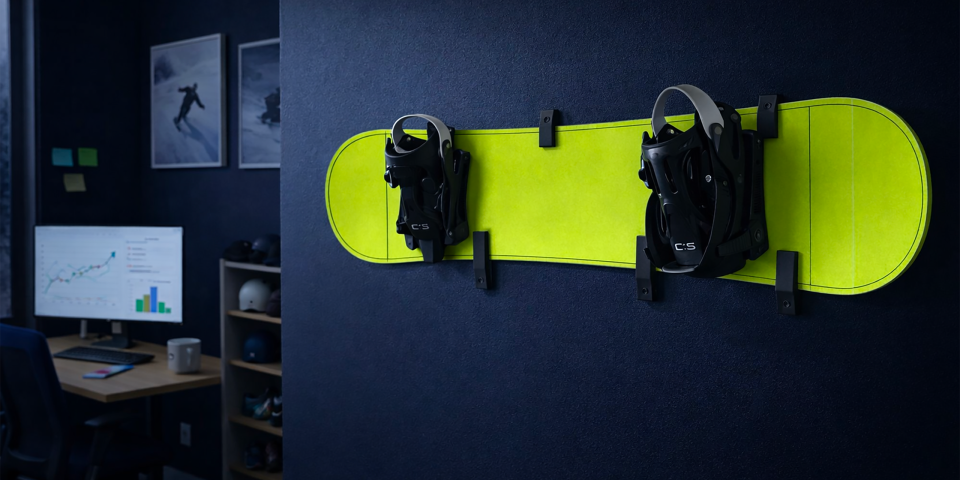
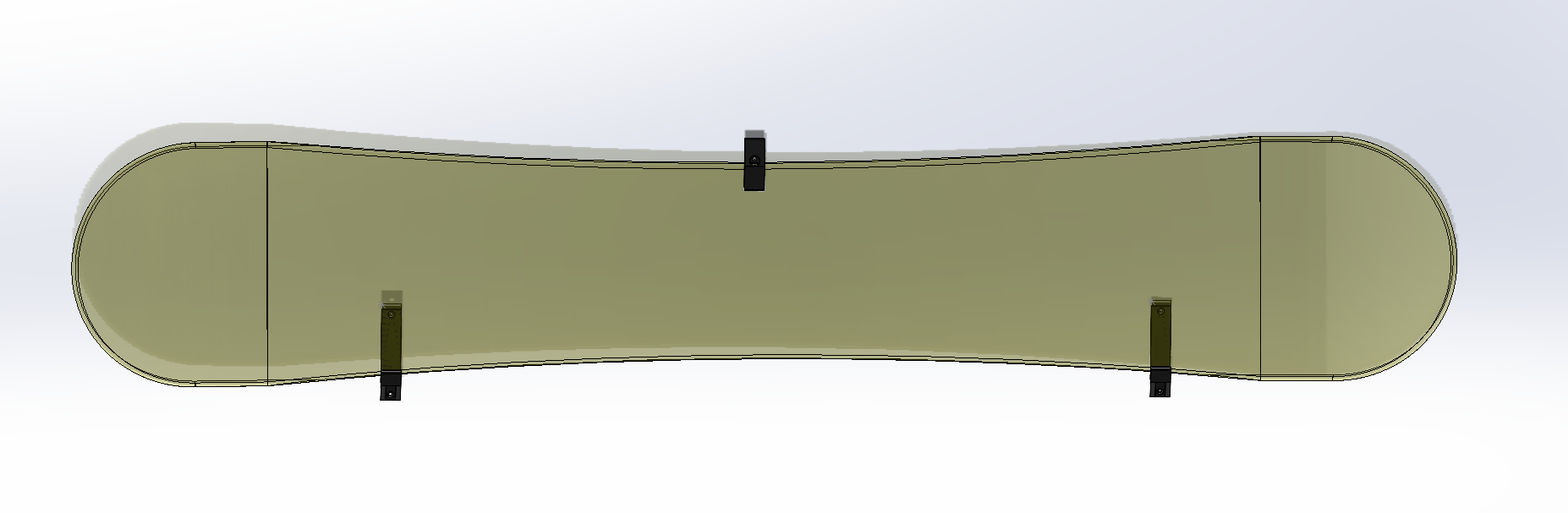
              With this in mind, the Montreal additive manufacturing team wanted to make a real difference. Nearly half of its members actively participated in the event. The others supported the cause through creative initiatives, such as designing and 3D printing snowboard wall mounts, which were offered to donors.

              These mounts allowed donors to transform their snowboards into unique decorative pieces. No more garage storage, their boards now proudly hang on display.

              To better understand the context, before diving into our additive manufacturing project, let’s first explore what the 24h Tremblant is and why it is so inspiring.

              L'impression 3D au service des enfants

              24h Tremblant, a unique event

              The 24h Tremblant is much more than a sporting challenge. It is a charitable event that combines effort, solidarity, and commitment to children supported by the Montreal Children’s Hospital Foundation. For 24 hours, teams take turns participating in activities such as running, walking, or skiing.

              For our team of 3D experts, it was an opportunity to hit the slopes… or rather, the boards. Every team member is a snowboarder, which made the experience even more fun and enjoyable.

              Each lap, each relay reminded us why we were there: to bring hope and support to incredibly courageous children. This year, we had the honor of sponsoring Stefano, a 15-year-old hockey enthusiast whose resilience inspired everyone. Present on the slopes, he actively participated, sharing his motivation and energy with all.

              The atmosphere was festive, intense, and emotional. We laughed, encouraged each other, and pushed ourselves, all while keeping in mind that every donation and every effort helps improve the lives of young patients and their families.

              Why this type of event makes an impact

              In fact, events like the 24h Tremblant go far beyond a simple sporting challenge. They bring people together around a meaningful cause, generate tangible funding, and raise awareness about the realities faced by children and their families. Every participant, whether on the slopes or fundraising, contributes directly to improving the well-being of children supported by the Montreal Children’s Hospital Foundation.

              In this context, for SolidXperience, this participation is part of a broader commitment. Each year, several teams also take part in the 48h Make-A-Wish, a similar event where collective energy helps transform the lives of children facing serious health challenges. Like the 24h Tremblant, these experiences raise awareness, mobilize people, and inspire action. They also strengthen team spirit, as pushing limits together for a shared cause creates lasting bonds.

              The 24h Tremblant 2025 is a perfect example. By sponsoring Stefano, 16, a hockey fan and aspiring sports broadcaster, we witnessed firsthand the real impact of such an event. Despite living with two rare conditions, congenital central hypoventilation syndrome and Hirschsprung’s disease, Stefano actively participated, sharing his determination and positivity with everyone.

              These events are not just fundraisers. They highlight the courage and resilience of children while giving participants the opportunity to make a meaningful difference.

              The additive manufacturing project: snowboard mounts

              Concretely, to support the 24h Tremblant, our additive manufacturing team wanted to contribute in a concrete and creative way. We leveraged the mechanical properties of Onyx to design and 3D print mounts capable of securely and aesthetically holding a full snowboard.

              To achieve this, several steps were followed. The goal was to create a part strong enough to safely support a snowboard while keeping material costs under $10. To do so, we applied a specific 3D printing approach called “design to failure.” This method involves designing the simplest possible part, testing it, and then reinforcing only the areas that need improvement.

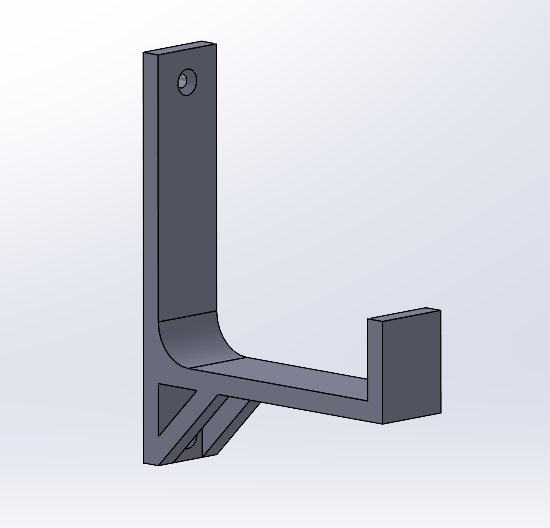
              The first design tested was as follows:

              Impression 3D de supports à snowboard

              However, after initial testing, several issues were identified.

              • When the snowboard was positioned close to the wall, the mount held it well. However, the bindings caused the board to tilt forward easily.
              • When the snowboard was placed farther from the wall, it was stable, but the mount bent and needed reinforcement and extension to ensure safety.

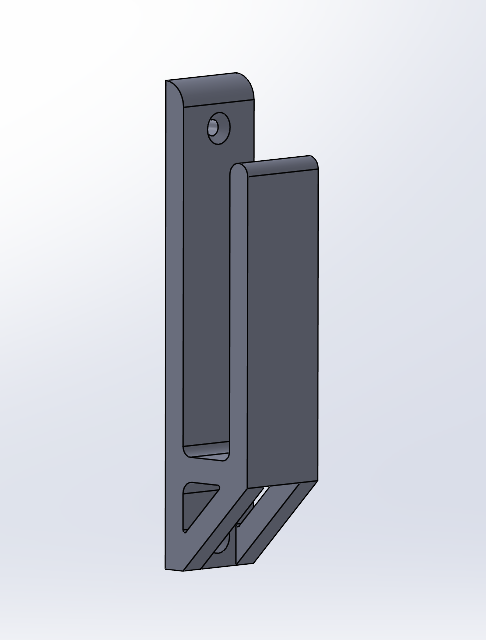
              Based on these observations, a second version was designed. It maintained the idea of keeping the board as close to the wall as possible to reduce the load moment. The design was modified to keep the board stable and vertical while ensuring safety.

              Support à snowboard en impression 3D

              This second version performed well in real conditions but was not yet fully secure. The front section holding the board tended to deform. As this deformation increased, the weight created more leverage, adding stress to the mount.

              To address this, a third version was then designed and printed.

              Imprimante 3D utilisée pour imprimer les supports

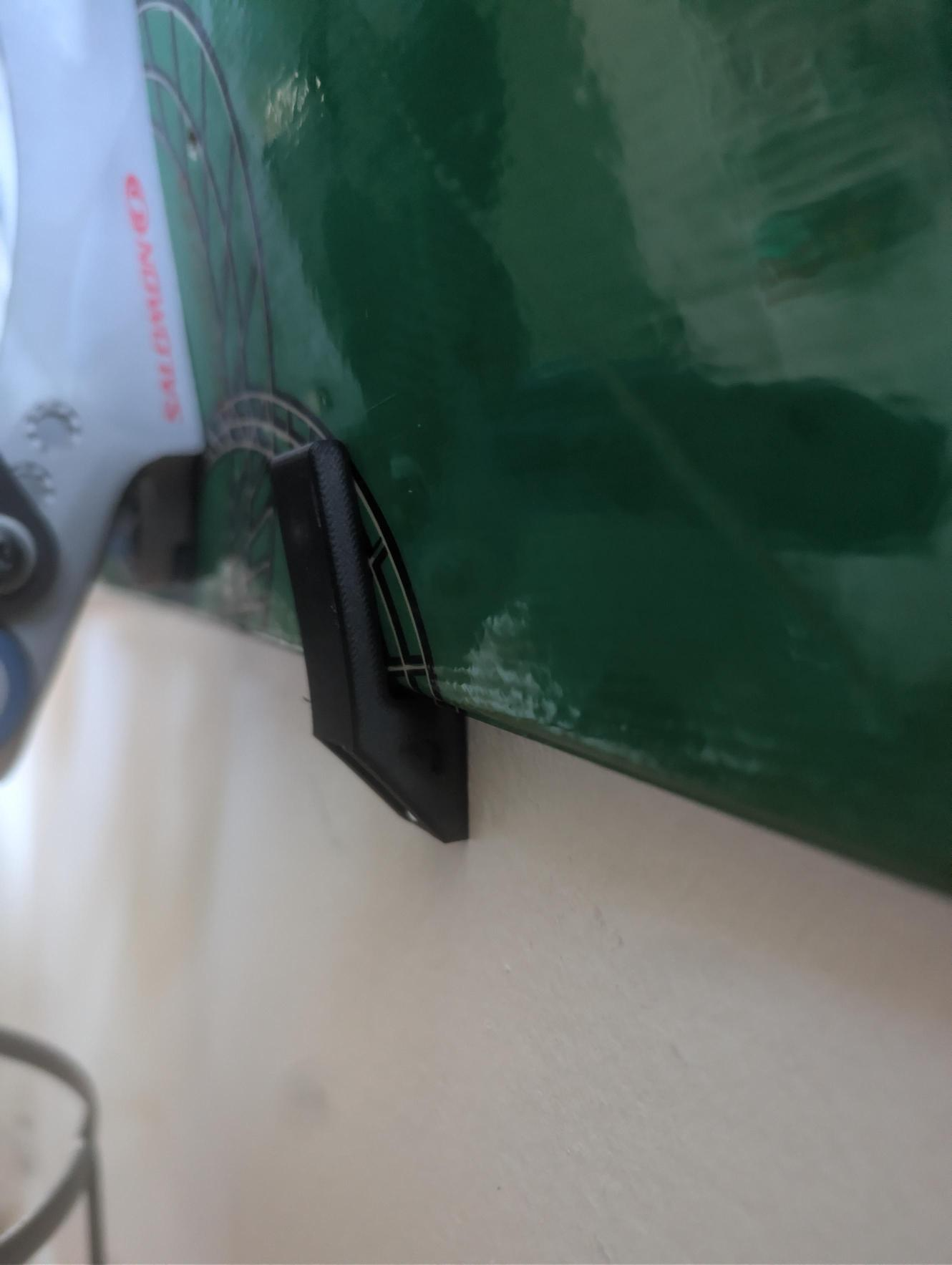
              This version introduced a third hook at the top to prevent any tipping movement. This adjustment significantly reduced the load on the two wall supports. The material savings from earlier optimizations more than compensated for the addition of this third component.

              In real-world conditions, the snowboard is now fully supported and can be securely mounted on the wall.

              Crochets à snowboard finaux

              In the end, by following the “design to failure” approach, we successfully developed a snowboard wall mount with a material cost under $10. These mounts were offered to donors who met the criteria and were interested.

              Producing each piece was a real pleasure, and today, every time I see my snowboard hanging on the wall, I’m reminded of the mountain, the energy of the 24h Tremblant, and the incredible experience we shared.

              A project that combines passion, teamwork, and impact

              Ultimately, this project demonstrated that creativity and innovation can be used to support a meaningful cause. Each 3D-printed mount combined engineering, the joy of making, and tangible support for both donors and children.

              Above all, beyond the technical aspects, this experience strengthened team spirit and solidarity. Every snowboard mounted on a wall is a reminder of the energy of the 24h Tremblant and the real impact we can have when we bring our talents together for a cause that matters.

              What if your next project could make a difference too? Our experts are here to help. Contact us oday.


              Lilian

              Lilian Beatrix

              Additive Manufacturing Specialist

              X_green_halo

              Any questions? Need help? Ask one of our experts.

              Whether you’re ready to get started or just have a few more questions, you can contact us toll-free:

                Connecting SOLIDWORKS Desktop to the 3DEXPERIENCE Platform

                BLOG

                Connecting SOLIDWORKS Desktop to the 3DEXPERIENCE Platform

                [techtips_featured_image_shortcode]

                The 3DEXPERIENCE platform includes a wide range of powerful, web-based apps, but many teams prefer to continue designing in the familiar SOLIDWORKS desktop environment. The good news? You don’t have to choose one or the other.

                By combining SOLIDWORKS desktop with the Design with SOLIDWORKS connector, you can keep your existing workflows and interface while taking full advantage of cloud-based file storage, sharing, and collaboration.

                In this article, we’ll walk through:

                • Installing the Design with SOLIDWORKS connector

                • Launching SOLIDWORKS with the 3DEXPERIENCE connection enabled

                • Saving files directly to the platform

                • Managing your local cache for best performance

                Installing Design with SOLIDWORKS

                First, once your 3DEXPERIENCE tenant is activated, or you’ve been invited to an existing one , linking SOLIDWORKS desktop to the platform is quick and straightforward.

                • In the 3DEXPERIENCE interface, click the Compass icon in the upper-left corner.

                • Scroll down to My Apps and locate Design with SOLIDWORKS.

                • Select the app to begin the installation.

                Installing Design with SOLIDWORKS

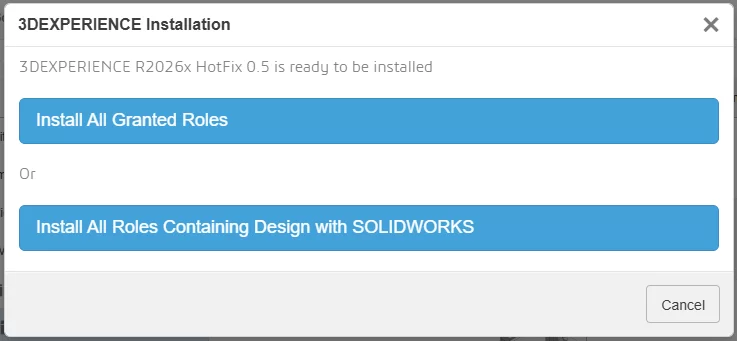
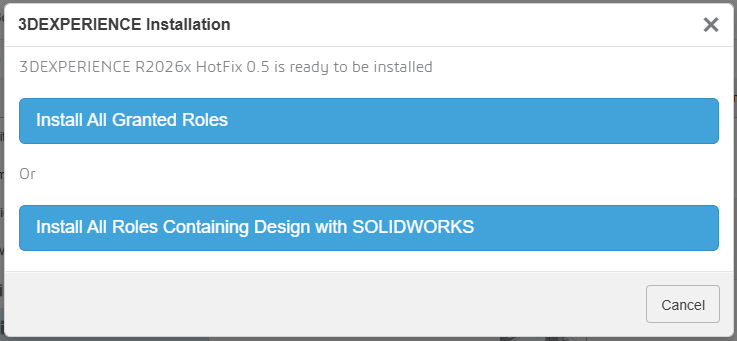
                During installation, you’ll be prompted to:

                • Install all granted roles, or

                • Install only the roles required for the Design with SOLIDWORKS connector

                Installing Design with SOLIDWORKS

                The installer will then allow you to choose:

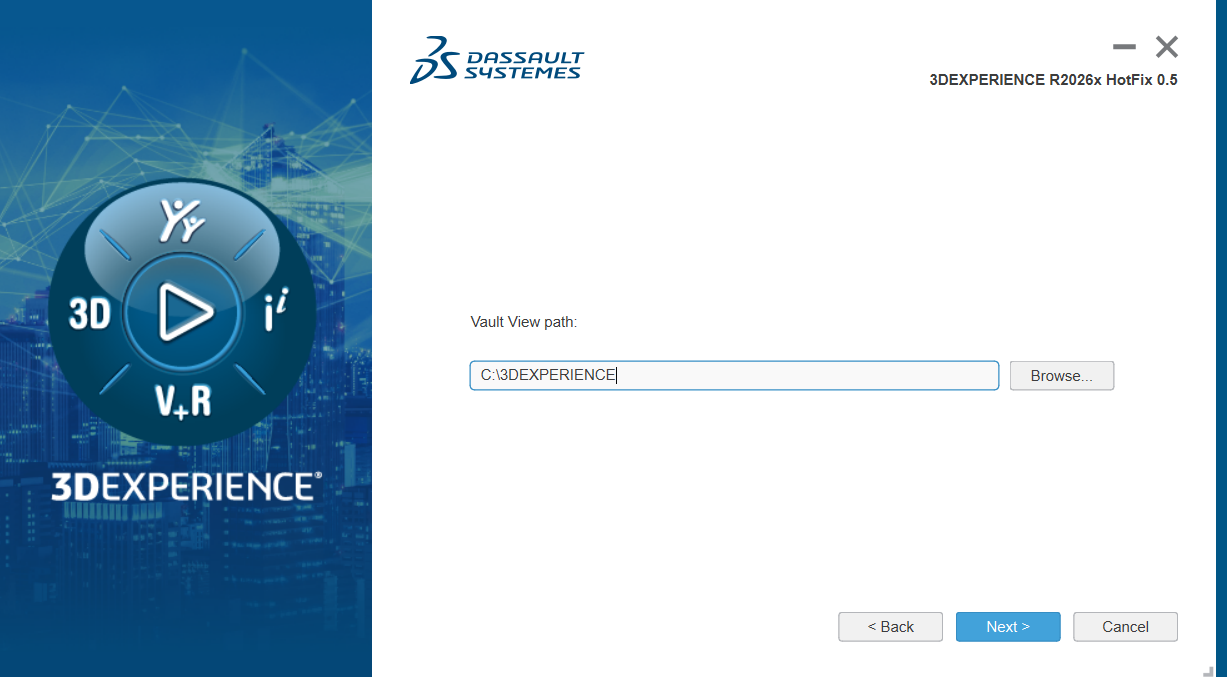
                • The installation directory

                • The location of your 3DEXPERIENCE cache

                By default, the cache is stored in C:\3DEXPERIENCE. Since the cache is managed directly from within SOLIDWORKS, you typically won’t need to access this folder manually.

                The cache is stored in C:\3DEXPERIENCE

                Once installation is complete, the connector is added to your system.

                Enabling the 3DEXPERIENCE Add-In in SOLIDWORKS

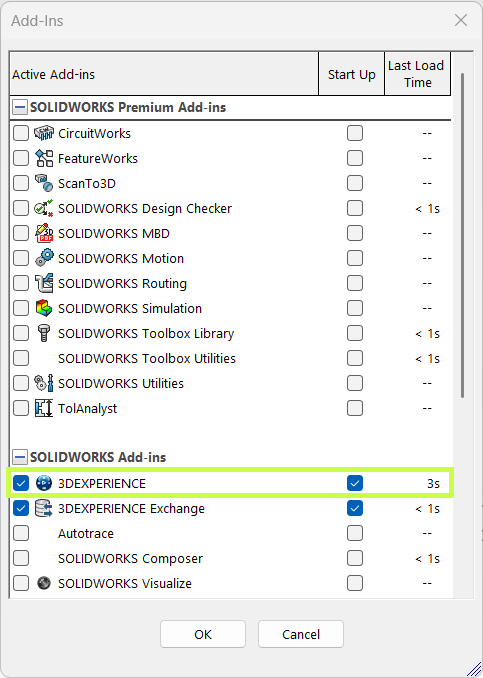
                Before using the connector, take a moment to confirm the 3DEXPERIENCE add-in is enabled in SOLIDWORKS.

                • Launch SOLIDWORKS.

                • Go to Settings > Add-Ins.

                • Verify that the 3DEXPERIENCE add-in is installed and checked.

                Enabling the 3DEXPERIENCE Add-In in SOLIDWORKS

                This ensures SOLIDWORKS can communicate properly with the platform.

                Launching SOLIDWORKS with the Connector

                One important workflow change to be aware of is how you launch SOLIDWORKS.

                • Launching SOLIDWORKS from a desktop shortcut or system search opens the standard desktop version without the 3DEXPERIENCE connection.

                • To use the connector, launch Design with SOLIDWORKS instead.

                This starts SOLIDWORKS with full 3DEXPERIENCE functionality enabled.

                You can also:

                • Use the dropdown next to Design with SOLIDWORKS to check for updates or uninstall

                • Create a dedicated desktop shortcut for Design with SOLIDWORKS, allowing you to access cloud functionality without opening a web browser

                Launching SOLIDWORKS with the Connector

                Saving Files to the 3DEXPERIENCE Platform

                Once connected, saving files to the cloud is seamless.

                You can:

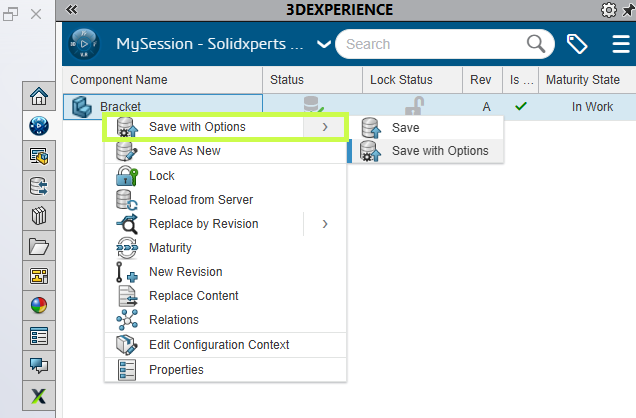
                • Use Save to 3DEXPERIENCE from the File menu (alongside Save and Save As), or

                • Use the 3DEXPERIENCE Task Pane, added by the add-in

                The task pane lets you:

                • Browse your tenant

                • Search for existing data

                • Right-click and save files directly to the platform

                And if needed, you can still save files locally, the connector doesn’t force you into a cloud-only workflow.

                Saving Files to the 3DEXPERIENCE Platform

                Managing the 3DEXPERIENCE Cache

                When you open or edit files stored on the platform, they’re downloaded locally to your 3DEXPERIENCE cache. Keeping this cache clean can significantly improve performance.

                The 3DEXPERIENCE add-in makes cache management easy:

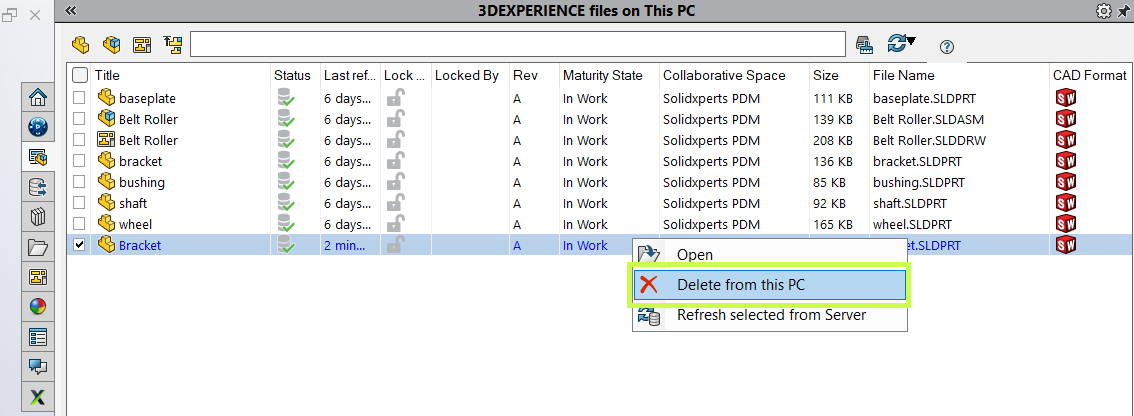
                • Delete individual cached files

                • Use the cleanup tool to remove files older than a specified date

                The cleanup utility is smart. It automatically skips:

                • Files referenced by assemblies

                • Files not yet saved to the platform

                • Files that are currently locked

                This helps you clear space without risking your data.

                Saving Files to the 3DEXPERIENCE Platform

                Final Thoughts

                The Design with SOLIDWORKS connector bridges the gap between SOLIDWORKS desktop and the 3DEXPERIENCE platform, giving you the best of both worlds. You get cloud-based collaboration and data management without changing how you design.

                If you need help installing the connector, optimizing your workflow, or rolling this out to your team, your Solidxperts team is here to help.

                Looking to learn more?

                • Explore additional articles and tutorials

                • Connect with other users and experts

                • Or reach out to us! We’re always happy to help you get the most out of your tools


                Michael Habrich

                3DEXPERIENCE Specialist

                X_green_halo

                Any questions? Need help? Ask one of our experts.

                Whether you’re ready to get started or just have a few more questions, you can contact us toll-free:

                  7 Myths About AI: Demystifying Bias and Technological Limits

                  BLOG

                  7 Myths About AI: Demystifying Bias and Technological Limits

                  [techtips_featured_image_shortcode]

                  Every wave of innovation in artificial intelligence (AI) brings real technological progress, along with a dramatic rise in hype. With every breakthrough, new narratives emerge: AI is portrayed as “magical,” endowed with its own will, on the verge of becoming superhuman, or conversely as something completely uncontrollable by law.

                  As a result, this fog of myths makes AI opaque to the public, complicates decision-making for organizations, and distracts attention from the real technical and societal challenges.

                  In this article, we aim to clarify two key questions:

                  • What are the main myths currently surrounding AI?

                  • And what technical, physical, and social realities help dismantle them?

                  The Major Myths Shaping Our View of AI

                  Several myths structure today’s collective imagination about artificial intelligence.

                  “AI has agency.”
                  The idea that AI systems act on their own initiative, with intentions, goals, or desires.

                  “Superintelligence is imminent.”
                  The belief that we are only a few years, or even months, away from a general intelligence far surpassing human capabilities.

                  “AI can be objective or impartial.”
                  The assumption that algorithms are inherently neutral because they rely on computation.

                  “AI has a clear definition.”
                  As if AI referred to a single, clearly defined technology, when in reality no universal definition exists.

                  “Ethical guidelines are enough to protect us.”
                  The perception that voluntary ethical charters are sufficient safeguards against harmful AI uses.

                  “AI cannot be regulated.”
                  The claim that technological innovation moves too fast for legal systems to keep up.

                  “AI can solve any problem.”
                  The idea that AI is a universal solution applicable to any technical, economic, or social challenge.

                  In reality, these myths stem from a mixture of marketing, science fiction, and technical misunderstanding. To move beyond them, we need to return to what AI actually is today.

                  1. Agency and Consciousness: AI as a “Stochastic Parrot”

                  One of the most common misconceptions is attributing intention to AI. We often talk about what AI “wants,” “decides,” or “thinks.” Yet modern systems, especially large language models (LLMs), function much more simply.

                  Models That Predict, Not Understand

                  An LLM does not interpret your sentences in the human sense. Technically, it:

                  • receives a sequence of tokens (pieces of words) as input

                  • computes a probability distribution over the next token using a trained neural network

                  • selects or samples the next token according to this distribution

                  • repeats the process until a complete response is produced

                  This mechanism relies on massive statistical correlations learned during training. At no point does the system possess:

                  • semantic understanding of concepts

                  • an internal model of the world comparable to a human’s

                  • independent intentions or goals

                  In other words, what researchers sometimes call a “stochastic parrot”: a machine that reproduces learned language structures in sophisticated probabilistic combinations.

                  Anthropomorphism as a Persistent Bias

                  If these systems appear to “think,” it is largely because humans naturally anthropomorphize systems that display seemingly intelligent behavior. This cognitive bias is central to many misunderstandings about AI today.

                  2. Superintelligence and the Resource Wall

                  Another dominant narrative suggests that we are on the verge of general superintelligence, held back only by corporate caution. However, the actual infrastructure behind AI tells a different story.

                  The Data Wall: A Finite Resource

                  Today’s large models rely on enormous volumes of high-quality human-generated data: text, conversations, code, and multimedia content. But this resource is not infinite.

                  Estimates suggest that high-quality training data suitable for ever-larger models could be largely exhausted between 2026 and 2032. Beyond that point:

                  • existing datasets would be reused repeatedly, yielding limited improvements

                  • or synthetic data would be used, introducing new risks and feedback loops

                  Physical Constraints and Diminishing Returns

                  The idea of unlimited growth in model power faces several practical limits.

                  Energy and cooling constraints
                  The computing density required for training and deploying the largest models pushes data centers toward limits in:

                  • electrical grid capacity

                  • cooling infrastructure needed to dissipate heat

                  Hardware limits
                  GPUs and other accelerators are approaching physical limits in terms of performance per watt and cost efficiency.

                  Diminishing returns
                  Scaling models by increasing parameters, data, or compute still improves performance, but each additional gain becomes smaller relative to the resources invested.

                  These “resource walls” do not prevent progress, but they challenge the idea of a straightforward path toward limitless superintelligence.

                  3. Objectivity and Impartiality: AI as a Mirror of Human Bias

                  AI is often presented as a way to eliminate human bias. In reality, AI systems frequently inherit and sometimes amplify existing inequalities.

                  Data Bias: Who Is Represented?

                  Models can only generalize effectively if training data represent a sufficiently diverse set of situations and populations.

                  When datasets are imbalanced, performance degrades unevenly. Studies have shown, for instance, that some facial recognition systems exhibit error rates up to 35% higher for darker-skinned women than for white men.

                  This is not an isolated bug. It reflects underlying representation biases in the data.

                  Design Bias: Optimization Choices Matter

                  Even with balanced datasets, models reflect the priorities of their designers:

                  • How is overall accuracy balanced against fairness between groups?

                  • Which metrics are optimized during training and deployment?

                  • What trade-offs are accepted between false positives and false negatives?

                  These decisions directly shape who benefits from an AI system and who may be harmed. Claims of algorithmic objectivity often overlook these design choices.

                  4. The Plural Architecture of AI

                  Contrary to popular belief, “artificial intelligence” does not describe a single unified technology. Instead, it is an umbrella term covering a broad and heterogeneous set of methods, theories, and applications.

                  A Hierarchy of Often-Confused Concepts

                  Many people use AI, Machine Learning, and Deep Learning interchangeably, although they represent different levels of abstraction.

                  Artificial Intelligence (AI)
                  The broader field of computer science focused on creating systems capable of performing tasks that require human-like cognitive abilities.

                  Machine Learning (ML)
                  A subset of AI in which systems learn patterns from data rather than relying solely on explicit programming.

                  Deep Learning (DL)
                  A specialized ML approach using multi-layer neural networks to process complex data such as images, speech, or language.

                  Divergent Definitions

                  The meaning of AI changes depending on perspective.

                  • Scientific definition: a research discipline exploring computational models of cognition.

                  • Technological definition: systems capable of perceiving their environment and taking actions accordingly.

                  • Popular definition: a largely anthropomorphic vision attributing awareness or autonomy to machines.

                  A Fragmented Ecosystem

                  AI is not monolithic. It includes multiple research traditions and technical approaches.

                  Two historical families illustrate this diversity:

                  Symbolic AI
                  Systems based on logical rules and expert knowledge.

                  Connectionist AI
                  Statistical approaches based on large datasets and neural networks, including modern language models.

                  Narrow AI vs General AI

                  Today’s systems belong entirely to narrow AI, designed to perform specific tasks such as:

                  • playing chess

                  • recognizing objects in images

                  • detecting fraud

                  • generating text

                  Artificial General Intelligence (AGI), capable of learning any intellectual task a human can perform, remains a speculative concept.

                  5. Ethics, Marketing, and the Need for Regulation

                  In response to AI risks, many organizations have adopted ethical charters and voluntary guidelines. While useful, these tools have clear limitations.

                  Ethical Marketing

                  Without enforcement mechanisms, many ethical charters function more as reputation tools:

                  • they reassure stakeholders

                  • they improve brand image

                  • but they rarely prevent high-risk systems from being deployed

                  Toward Enforceable Regulation: The EU AI Act

                  Contrary to the myth that AI cannot be governed, regulatory frameworks are emerging.

                  The European Union’s AI Act proposes a risk-based approach:

                  • Unacceptable risk systems are banned

                  • High-risk systems must comply with strict requirements including transparency, traceability, documentation, conformity assessments, and human oversight

                  • Minimal risk systems face limited regulation

                  The goal is not to slow innovation, but to ensure that AI systems remain accountable within existing legal frameworks.

                  6. AI Is Not a Magic Wand

                  Perhaps the most persistent myth is that AI can solve any problem.

                  In reality, successful AI systems are:

                  • specialized, designed for specific tasks such as image recognition, text summarization, fraud detection, or code generation

                  • limited in common sense, often failing when faced with situations outside their training distribution

                  • highly context-dependent, relying on data quality, system integration, and human oversight

                  The same model may perform extremely well in a well-defined environment yet fail dramatically when conditions change or when real-world usage diverges from intended scenarios.

                  AI as a Component, Not a Strategy

                  For organizations, AI should be viewed as:

                  • a technical component within a larger system architecture

                  • integrated into a broader strategy involving governance, metrics, risk management, and human supervision

                  The wrong question is:

                  “How can we add AI everywhere?”

                  The better question is:

                  “On which well-defined problems does AI provide a real advantage compared to existing solutions?”

                  Moving Beyond the Myths

                  Today’s AI is neither a conscious entity, nor an imminent superintelligence, nor a universal solution.

                  It is a set of powerful techniques deeply grounded in real-world constraints. These systems are limited by physical infrastructure such as energy, cooling, and hardware, as well as by the availability of data and computational resources. They are also shaped by the social structures and human biases embedded in the data and objectives guiding their development.

                  By dismantling the myths surrounding AI, autonomous agency, imminent superintelligence, perfect objectivity, legal ungovernability, or universal applicability, we can ask better technical questions, design safer systems, and build more effective regulatory frameworks.

                  Ultimately, understanding these realities allows us to treat AI for what it truly is: a powerful but specialized tool that must be used with rigor, transparency, and human oversight.

                  If you have questions about AI and its practical applications, our experts are here to help. Contact us to start the conversation.



                  Benoit Bilodeau

                  Senior Solutions Architect

                  X_green_halo

                  Any questions? Need help? Ask one of our experts.

                  Whether you’re ready to get started or just have a few more questions, you can contact us toll-free:

                    Artificial Intelligence in Engineering: Automation Without Losing the Human Touch

                    BLOG

                    Artificial Intelligence in Engineering: Automation Without Losing the Human Touch

                    [techtips_featured_image_shortcode]

                    Artificial intelligence (AI) is playing an increasingly important role in engineering processes, particularly when it comes to automating repetitive tasks and accelerating the production of technical documentation. However, its role remains fundamentally complementary to that of engineers. Creativity, domain expertise, and decision-making responsibility remain human.
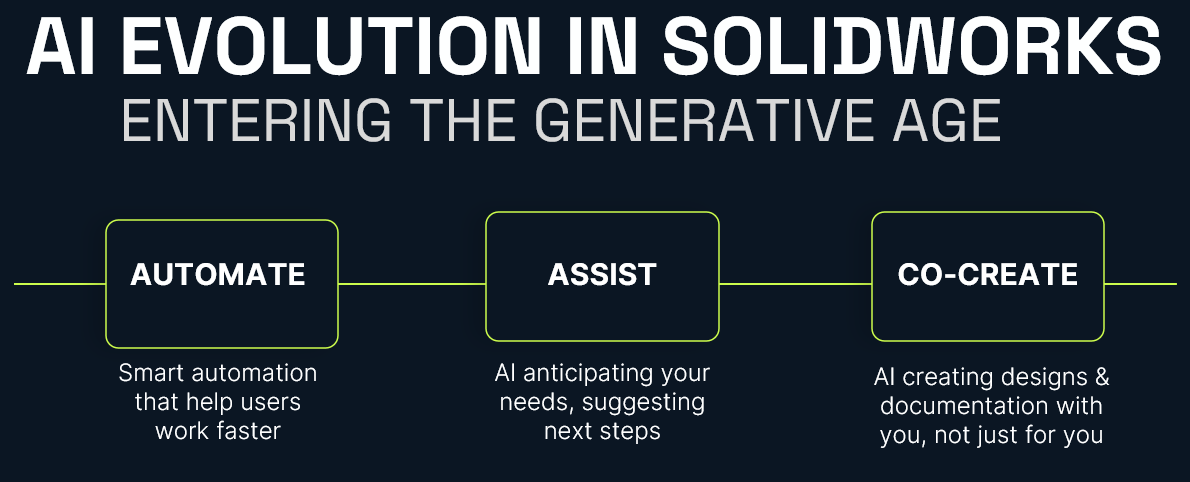
                    In this article, we explore:

                    • what AI concretely brings to engineering

                    • which tasks remain (and will remain) human

                    • how to organize an effective human–machine collaboration

                    • and what this means for the engineering profession

                    1. What AI concretely brings to engineering

                    1.1 Automating repetitive, low-value tasks

                    The daily work of engineering teams is filled with essential but repetitive tasks that consume a great deal of time without fully leveraging engineers’ expertise. This is precisely where AI excels.

                    A typical example is generating technical drawings from 3D models.

                    Traditionally, producing technical drawings involves:

                    • manually creating the different views (front, section, detail views)

                    • applying dimensioning and tolerancing standards

                    • reusing elements from previous projects, often manually

                    • performing successive checks for consistency and compliance

                    With AI, a large portion of this work can be:

                    • automated: generating technical drawings directly from 3D designs

                    • contextualized: taking into account company history, internal standards, and previously validated models

                    The result: fewer repetitive clicks and more time for analysis and improvement.

                    1.2 Measurable efficiency gains

                    The operational impact is far from marginal.

                    Where dozens of people were previously needed to produce, adjust, and verify detailed drawings, organizations can now concentrate human work within a smaller team of reviewers responsible for:

                    • correcting the remaining inconsistencies

                    • validating compliance

                    • managing special cases not covered by the models

                    AI handles the repetitive heavy lifting. Humans focus on quality, reliability, and exception management.

                    2. Tasks that remain (and will remain) human

                    Despite these gains, certain activities remain difficult to automate and may remain so in the short and medium term.

                    2.1 Creative design and early project phases

                    The early stages of a project, when the architecture of a product and the major technical choices are defined, rely on:

                    • creativity

                    • accumulated domain expertise

                    • the ability to integrate sometimes ambiguous constraints (real-world usage, environment, maintenance, ergonomics)

                    • complex decision-making that affects overall product performance

                    These activities require systemic understanding, multi-criteria trade-offs, and a form of intuition that current AI models cannot replicate.

                    2.2 Safety, compliance, and responsibility

                    A clear example is the design of powerful machinery.

                    Engineers must:

                    • integrate safety factors to protect users

                    • sometimes introduce additional margins based on experience or real-world conditions that are difficult to simulate

                    These decisions directly affect safety, regulatory compliance, and legal responsibility.

                    Today, these types of decisions cannot be delegated to AI.
                    Decision-making responsibility remains with humans, not algorithms.

                    3. Toward intelligent human–machine collaboration

                    The key question is therefore not whether AI will replace engineers, but how to organize an effective collaboration between the two.

                    3.1 AI as a copilot during design

                    During the design process, AI can act as a copilot or technical assistant. For example, it can:

                    • propose lighter materials that still meet strength requirements

                    • suggest geometric variations to reduce weight or improve rigidity

                    • quickly analyze the impact of small design changes on overall performance

                    In practice, engineers can ask AI questions such as:

                    • “Which materials meet these strength and weight constraints?”

                    • “What geometric alternatives could reduce the mass by 10 percent?”

                    However, final validation, trade-off decisions, and system integration remain the responsibility of the engineer.

                    3.2 AI as an analyst for standardized tasks

                    For more standardized analytical tasks, AI becomes a particularly useful engineering assistant. It can support:

                    • the processing and structuring of large volumes of data

                    • the automatic generation of variants for comparative studies

                    • consistency checks across large sets of technical documentation

                    This allows teams to explore more possibilities in less time, without removing the engineer from the decision-making process.

                    4. Should engineers fear being replaced by AI?

                    The fear of being replaced by machines is real and understandable, especially in technical professions.

                    4.1 Vulnerable jobs vs resilient jobs

                    A job is more exposed to automation when its tasks are:

                    • repetitive

                    • highly standardized

                    • not very creative

                    • associated with limited decision-making

                    In contrast, a job is more resilient when it involves:

                    • significant creativity

                    • a global understanding of complex systems

                    • multi-criteria trade-offs (cost, performance, risk, environmental impact)

                    • strong responsibility for safety, compliance, or performance

                    In engineering, activities such as:

                    • defining a product’s overall architecture

                    • breakthrough innovation

                    • high-impact technical decisions

                    • field responsibility

                    remain firmly within the human domain.

                    4.2 A change in role rather than disappearance

                    Consider the example of technical documentation.
                    Yes, AI can generate documents based on validated models or historical data.

                    No, it does not replace engineers when it comes to:

                    • critical decision-making

                    • technical trade-offs

                    • creative innovation

                    What changes most is how time is allocated:

                    • less manual and repetitive production work

                    • more design, analysis, validation, and innovation

                    Toward augmented engineering, not automated engineering

                    Artificial intelligence brings real value to engineering by:

                    • automating repetitive, low-value tasks

                    • accelerating the generation of drawings and technical documentation

                    • assisting engineers in exploring design alternatives and performing analysis

                    However, creativity, domain expertise, and responsibility remain central to the engineer’s role.

                    The goal is not to replace humans, but to build intelligent collaboration:

                    • letting AI handle what it does best (speed, repetition, scale)

                    • preserving what defines engineering expertise: inventing, evaluating trade-offs, and taking responsibility for decisions

                    The future of engineering will not be “human or AI,” but clearly human + AI: augmented engineering that is more efficient, safer, and more focused on innovation.

                    Benoit Bilodeau

                    Senior Solutions Architect

                    X_green_halo

                    Any questions? Need help? Ask one of our experts.
                    Whether you’re ready to get started or just have a few more questions, you can contact us toll-free:

                        Download

                          Download

                            Download